Weighted Random Selection
Given an array of items, each with a corresponding weight, implement a function that randomly selects an item from the array, where the probability of selecting any item is proportional to its weight.
In other words, the probability of picking the item at index i is:
weights[i] / sum(weights).
Return the index of the selected item.
Example:
Input: weights = [3, 1, 2, 4]
Explanation:
sum(weights) = 10
3 has a 3/10 probability of being selected.
1 has a 1/10 probability of being selected.
2 has a 2/10 probability of being selected.
4 has a 4/10 probability of being selected.
For example, we expect index 0 to be returned 30% of the time.
Constraints:
- The
weightsarray contains at least one element.
Intuition
A completely uniform random selection implies every index has an equal chance of being selected. A weighted random selection means some items are more likely to be picked than others. If we repeatedly perform a random selection many times, the frequency of each index being picked will match their expected probabilities.
The challenge with this problem is determining a method to randomly select an index based on its probability.
Let’s say we had weights 1 and 4 for indexes 0 and 1, respectively:
![Image represents a Python code snippet assigning a list of weights. The snippet shows the variable weights being assigned a list containing two numerical values: 1 and 4. The assignment is represented using the equals sign (=). The list is denoted by square brackets ([ and ]). The numbers 0 and 1 are faintly visible below the numbers 1 and 4 respectively, possibly indicating indices or positions within the list. There is no other information, such as URLs or parameters, present in the image. The overall structure is a simple variable assignment statement common in programming languages.](/courses/coding-patterns/images/weighted-random-selection-1.svg)
Here, index 1 should be selected with a probability of 4/5, significantly higher than index 0’s probability of 1/5:
![Image represents a simple illustration of weight normalization in a context likely related to machine learning or weighted averaging. The top line shows a Python-like variable assignment, weights = [1 4], defining a weight vector with two elements: 1 and 4. Below, these weights are individually depicted with small downward arrows pointing to their normalized counterparts. The normalization appears to be a simple division by the sum of the weights (1+4=5). Therefore, the weight 1 is transformed into 1/5 (displayed in cyan), and the weight 4 is transformed into 4/5 (displayed in orange). The small numbers '0' and '1' above the arrows likely represent indices indicating the position of each weight within the original vector. The overall diagram visually demonstrates the process of converting a set of weights into their normalized probability distribution.](/courses/coding-patterns/images/weighted-random-selection-2.svg)
A useful observation is that all probabilities have the same denominator (which is 5 in this case). Now, imagine we had a line with the same length as this denominator, and we divided this line into two segments of size 1 and 4, respectively:

If we were to randomly pick a number on this line, we’d pick the first segment with a probability of 1/5 and the second segment 4/5 times. Now, imagine index 0 represents the first segment, and index 1 represents the second segment:

If we randomly select a number on this line, we’ll select index 0 with a probability of 1/5, and index 1 with a probability of 4/5. This reflects their expected probabilities.
What we need now is a way to identify which numbers on the number line correspond to which index so that when we pick a random number on this line, we know which index to return.
Before we continue, let’s establish the definitions of terms used in this explanation:
- “Weights” refers to the values of the elements in the weights array.
- “Indexes” refers to the indexes of the weights array.
- “Numbers” or “numbers on the number line” refers to the numbers from 1 to sum(weights).
Determining which numbers on the number line correspond to which indexes
As mentioned before, to know which index to return, we need a way to tell which index our random number line number corresponds to. Consider a larger distribution of weights:
![Image represents a visual depiction of weighted indexing. At the top, a list named 'weights' is defined as an array containing the integers [3, 1, 2, 4]. Below this, a horizontal bar is segmented into four color-coded sections, each labeled 'index 0,' 'index 1,' 'index 2,' and 'index 3,' respectively. The bar is further divided into numbered units from 1 to 10. Colored arrows connect the weights to the bar; a cyan arrow from the weight '3' points to the end of the 'index 0' section (at position 3), a green arrow from the weight '1' points to the end of the 'index 1' section (at position 4), an orange arrow from the weight '2' points to the end of the 'index 2' section (at position 6), and a magenta arrow from the weight '4' points to the end of the 'index 3' section (at position 8). Each arrow's length visually represents the corresponding weight value, indicating how many units each index occupies within the bar. The numbers above the arrows (0, 1, 2, 3) correspond to the index of the weight in the weights array.](/courses/coding-patterns/images/weighted-random-selection-5.svg)
One strategy is to use a hash map. In this hash map, each number on the line is a key, and its corresponding index is the value:
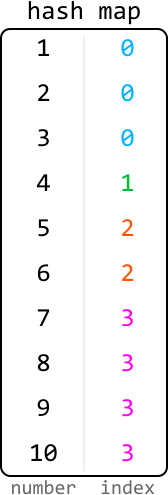
This method uses a lot of space because we need to store a key-value pair for each number on the number line. Let’s consider some other more space-efficient methods.
A more efficient strategy is to store only the endpoints of each segment instead.

Naturally, the endpoint of a segment marks where that segment ends. It also helps us know where the next segment begins, as each new segment starts right after the previous one ends. This way, we can determine the start and end of each index’s segment.
By storing only the endpoints, we need to keep just n values, one for each endpoint. When storing these endpoints in an array, the array index of each endpoint is the same as its index value on the number line:
![Image represents a visual depiction of an array, specifically a one-dimensional array or list. The array is enclosed in square brackets [ and ]. The array contains four elements: 3, 4, 6, and 10. These elements are displayed horizontally, separated by spaces. Below each element, in a lighter gray font, is an index indicating its position within the array. The indices start from 0 and increment sequentially: 0 for the element 3, 1 for the element 4, 2 for the element 6, and 3 for the element 10. The arrangement clearly shows the mapping between each element's value and its corresponding index within the array's structure.](/courses/coding-patterns/images/weighted-random-selection-8.svg)
The question now is, how do we find these endpoints?
Obtaining the endpoints of each index’s segment on the line
A key observation is that the endpoint of a segment is equal to the length of all previous segments, plus the length of the current segment. We can see how this works below:

This demonstrates that each endpoint is a cumulative sum, suggesting we can obtain the endpoint of each segment by obtaining the prefix sums of the array of weights:

As we can see, the prefix sums array stores the endpoint of each segment.
Now, let’s see how the prefix sums array helps us. When we pick a random number from 1 to 10, we need to determine which index it corresponds to using the prefix sum array. Let’s see how we can do this.
Using the prefix sums to determine which numbers correspond to which indexes
Let’s say we pick a random number from 1 to 10 and get 5. How can we use the prefix sum array to determine which index that 5 corresponds to? To determine the segment, we’ll need to find its corresponding endpoint. We know that:
- Either 5 itself is the endpoint, since 5 could be the endpoint of its own segment, or:
- The endpoint is somewhere to the right of 5 since its endpoint cannot be to the left.
Among all the endpoints to the right of 5, the closest one to 5 will be the endpoint of its segment. Endpoints farther away belong to different segments:
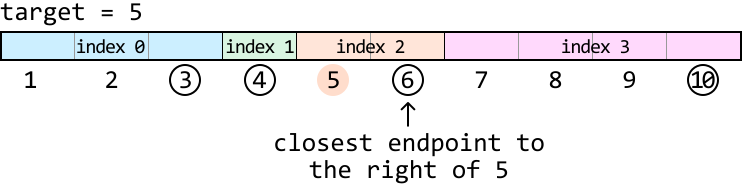
This means for any target, we’re looking for the first prefix sum (endpoint) greater than or equal to the target. Below, we can see which prefix sum first meets this condition for a target of 5:
![Image represents a depiction of prefix sums, showing an array prefix_sums initialized with values [3, 4, 6, 10]. The array is presented horizontally. Each element's value is displayed numerically. Below each element, a colored vertical line indicates its status: 'F' (in red) represents 'False', and 'T' (in green) represents 'True'. The first two elements (3 and 4) are marked with 'F', while the last two elements (6 and 10) are marked with 'T'. This suggests a visual representation of a boolean condition applied to the prefix sums, where the last two elements satisfy the condition and the first two do not. The arrangement visually links the numerical value of each element with its corresponding boolean status.](/courses/coding-patterns/images/weighted-random-selection-12.svg)
As we can see, the first prefix sum that satisfies this condition is the same as the lower-bound prefix sum that satisfies this condition. Therefore, we can perform a lower-bound binary search to find it.
Let’s see how this works over our example with a random target of 5. The search space should encompass all prefix sum values:
![Image represents a visual depiction of a two-pointer approach to finding a subarray with a target sum. Two orange rectangular boxes labeled 'left' and 'right' point downwards towards an array represented by prefix_sums = [3, 4, 6, 10]. Beneath each element of the prefix_sums array, its index (0, 1, 2, 3) is shown in gray. The number 6 in the prefix_sums array is highlighted in light green. A separate line indicates target = 5. The arrows from 'left' and 'right' visually suggest the movement of pointers across the prefix_sums array during the algorithm's execution, aiming to find a subarray whose sum equals the target value. The highlighted '6' likely represents a point where the algorithm might find a solution (or a relevant intermediate state), given that the difference between consecutive prefix sums could be used to determine the sum of subarrays.](/courses/coding-patterns/images/weighted-random-selection-13.svg)
Let’s begin narrowing the search space. Remember that we’re looking for the lower-bound prefix sum which satisfies the condition prefix_sums[mid] ≥ target.
The initial midpoint value is 4, which is less than the target of 5. This means the lower bound is somewhere to the right of the midpoint, so let’s narrow the search space toward the right:
![Image represents a visual depiction of a binary search algorithm's step within the context of prefix sums. The diagram shows four labeled boxes: 'left,' 'mid,' and 'right' representing index pointers, and a dashed box containing a conditional statement. 'left' and 'mid' point downwards to an array [3, 4, 6, 10] with indices 0, 1, 2, and 3 respectively displayed below each element. 'right' also points downwards to the same array. Below the array, 'target = 5' is specified. The dashed box displays the condition 'prefix_sums[mid] < target,' which evaluates whether the prefix sum at the 'mid' index is less than the target value (5). If true, as indicated by the arrow, the 'left' pointer is updated to 'mid + 1,' effectively narrowing the search space in a binary search fashion. The light blue box around 'mid' and the blue arrow visually emphasize the current 'mid' index and its role in the conditional statement.](/courses/coding-patterns/images/weighted-random-selection-14.svg)
![Image represents a visual depiction of a binary search algorithm's step. A sorted array [3, 4, 6, 10] is shown with indices 0, 1, 2, and 3 labeled below each element. A light gray rectangle labeled 'mid' points to the element '4' at index 1. An orange rectangle labeled 'left' points to the element '6' at index 2. A dark gray rectangle labeled 'right' points to the element '10' at index 3. A dashed orange line connects the 'mid' label to the element '3' at index 0, indicating a comparison. A solid orange arrow points from 'left' to '6', showing the selection of the left subarray. A solid dark gray arrow points from 'right' to '10', showing the selection of the right subarray. The arrangement visually demonstrates the partitioning of the array during a binary search iteration, with the 'mid' element acting as the pivot for comparison and subsequent subarray selection.](/courses/coding-patterns/images/weighted-random-selection-15.svg)
The midpoint value is now 6, which is greater than the target. This midpoint satisfies our condition, so it could be the lower bound. If it isn’t, then the lower bound is somewhere further to the left. So, let’s narrow the search space toward the left while including the midpoint:
![Image represents a visual depiction of a binary search algorithm step within a coding pattern context. The top shows three labeled boxes: 'left,' 'mid' (highlighted in cyan), and 'right.' Arrows point downwards from 'left' and 'right' to the array [3, 4, 6, 10], indicating index positions 0, 2, and 3 respectively. The 'mid' box points to the element '6' at index 2. Below the array, 'target = 5' is specified. A dashed box to the right shows a conditional statement: 'prefix_sums[mid] ≥ target,' which evaluates whether the prefix sum at the midpoint (6 in this case) is greater than or equal to the target (5). A right-pointing arrow from this condition leads to the assignment 'right = mid,' indicating that if the condition is true, the right boundary of the search space is updated to the midpoint. The overall diagram illustrates a single iteration of a binary search, where the algorithm checks if the prefix sum at the midpoint meets or exceeds the target value to refine the search range.](/courses/coding-patterns/images/weighted-random-selection-16.svg)
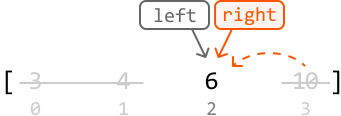
Now, the left and right pointers have met with the search space consisting of a single value which represents the lower bound. So, we can exit the binary search and return the index that corresponds to this prefix sum: left:
![Image represents a diagram illustrating a coding pattern, possibly related to binary search or a similar algorithm. At the top, two orange rectangular boxes labeled 'left' and 'right' are shown, with downward-pointing arrows indicating data flow. Below, a horizontally oriented array or list is depicted, showing the elements [3, 4, 6, 10] with their indices [0, 1, 2, 3] displayed underneath. The 'left' and 'right' labels appear to represent pointers or indices into this array. The arrows from 'left' and 'right' point to the element '6' in the array, suggesting that these pointers are converging on a specific element. To the right, a light gray, dashed-line rectangle contains the conditional statement 'left == right' followed by a right-pointing arrow and the action 'return left'. This indicates that if the left and right pointers are equal, the algorithm returns the value at the left pointer's index. The overall diagram visualizes a search or comparison process where two pointers move towards each other until they meet, at which point a result is returned.](/courses/coding-patterns/images/weighted-random-selection-18.svg)
Implementation
Python
JavaScript
Java

from typing import List
import random

class WeightedRandomSelection:
    def __init__(self, weights: List[int]):
        self.prefix_sums = [weights[0]]
        for i in range(1, len(weights)):
            self.prefix_sums.append(self.prefix_sums[-1] + weights[i])

    def select(self) -> int:
        # Pick a random target between 1 and the largest endpoint on the number
        # line.
        target = random.randint(1, self.prefix_sums[-1])
        left, right = 0, len(self.prefix_sums) - 1
        # Perform lower-bound binary search to find which endpoint (i.e., prefix
        # sum value) corresponds to the target.
        while left < right:
            mid = (left + right) // 2
            if self.prefix_sums[mid] < target:
                left = mid + 1
            else:
                right = mid
        return left

Complexity Analysis
Time complexity: The time complexity of the constructor is O(n)O(n)O(n) because we iterate through each weight in the weights array once. The time complexity of select is O(log(n))O(\log(n))O(log(n)) since we perform binary search over the prefix_sums array.
Space complexity: The space complexity of the constructor is O(n)O(n)O(n) due to the prefix_sums array. The space complexity of select is O(1)O(1)O(1).