Count Islands
Given a binary matrix representing 1s as land and 0s as water, return the number of islands.
An island is formed by connecting adjacent lands 4-directionally (up, down, left, and right).
Example:
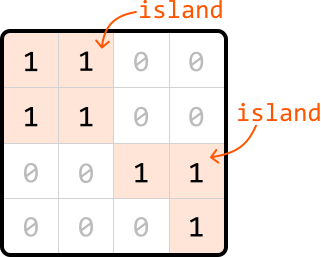
Output: 2
Intuition
Before determining how to find all the islands in a matrix, let’s consider an input that contains only one island.
Matrix with just one island
Consider the following matrix containing one island:
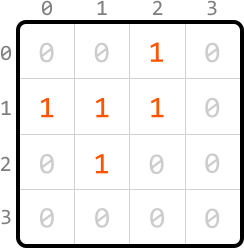
When we iterate through the matrix starting from the top left, the first land cell we encounter is cell (0, 2). From here, we’d like to find the rest of the island.
The key observation is that we should be able to access every land cell on the same island by moving horizontally or vertically through neighboring land cells. This means that all 1s forming an island are connected either directly or indirectly through adjacent 1s. Conceptually, this is similar to a graph, where each cell is a node, and each connection to an adjacent cell is an edge:
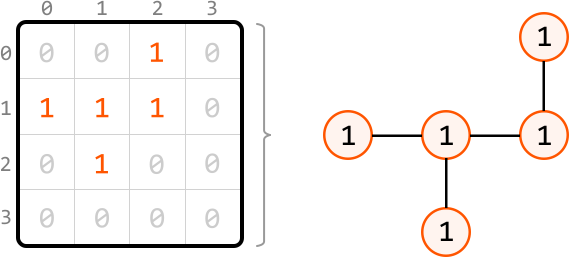
This demonstrates that we can identify the rest of the island by performing a graph traversal algorithm. Most traversal algorithms will suit this purpose. In this explanation, we’ll use DFS.
Depth-first search
For each cell we visit during the traversal, we need to mark that cell as visited to ensure it’s not visited again. There are two ways to do this:
-
Use a separate data structure, such as a hash set, to keep track of the coordinates of visited cells.
-
Modify the matrix by changing the value of a visited cell from 1 to -1, ensuring it doesn’t get revisited.
We’ll proceed with the second option because it doesn’t require the use of extra space.
Now, let’s begin DFS traversal. Mark the first cell, (0, 2), as visited by modifying its value to -1. Then, continue exploring by calling DFS on any neighboring land cells. Here, the only neighboring land cell is cell (1, 2):
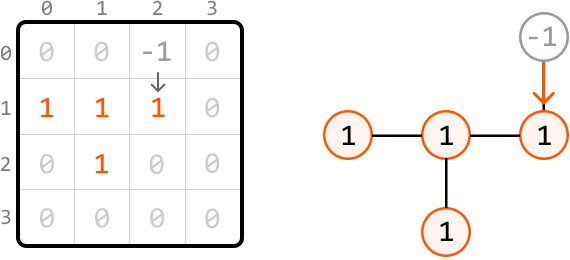
From cell (1, 2), we similarly mark it as visited and explore its neighboring land cells. Again, there’s only one neighboring land cell: (1, 1). So, let’s make a recursive DFS call to it:
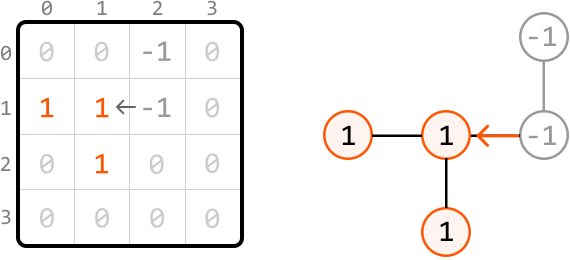
From cell (1, 1), mark it as visited and explore both of its neighboring land cells. Let’s continue exploring from cell (1, 0) first:
![Image represents a comparison between a matrix representation and a graph representation of data. On the left, a 4x4 matrix is shown with numerical values. Rows and columns are labeled 0-3. Most cells contain '0' (in light gray), but some contain '1' (in orange) and '-1' (in dark gray). Specifically, a '1' is located at matrix[1][0] and matrix[2][1]. A '-1' is present at matrix[0][2], matrix[1][1], and matrix[1][2]. An arrow points to the '1' at matrix[1][0], indicating a potential focus or starting point. On the right, a directed acyclic graph is displayed. Nodes represent numerical values; orange circles represent '1', and gray circles represent '-1'. Edges connect the nodes, showing relationships. An orange arrow points from a '1' node to a '-1' node, indicating a directional flow. The graph visually represents the connections and relationships between the non-zero elements in the matrix, with the orange '1' nodes corresponding to the '1's in the matrix and the gray '-1' nodes corresponding to the '-1's in the matrix. The structure suggests a possible flow or dependency between the data points.](/courses/coding-patterns/images/count-islands-6.svg)
At (1, 0), there’s no neighboring land. So, the recursive process naturally goes back to cell (1, 1) to continue exploring any other neighboring land cells:
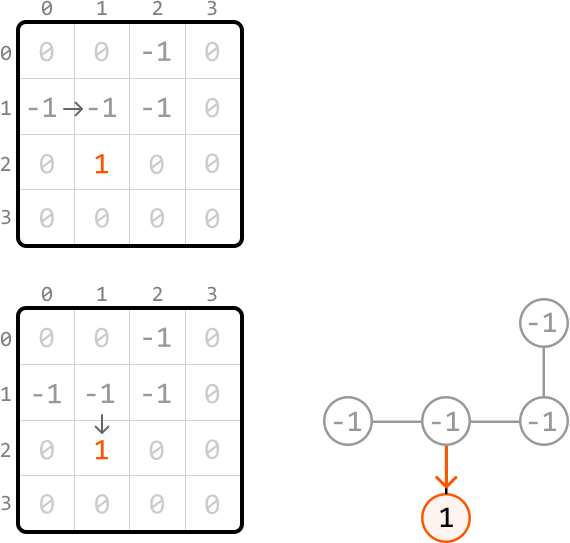
We’ve now finished exploring this island:
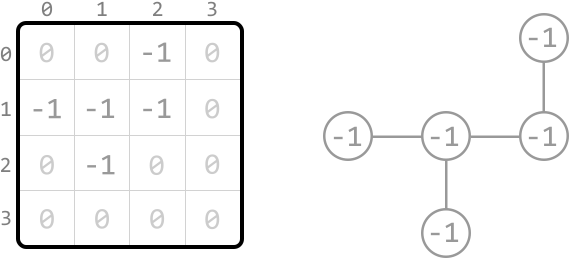
With this island completely explored, let’s increment a variable count to indicate that one new island has been found. Now, let’s consider the main problem where there could be multiple islands in the matrix.
Matrix with multiple islands
We can identify all islands using the following steps:
-
Search through the matrix, starting from cell (0, 0), until we find a land cell.
-
Upon encountering a land cell, explore its island using DFS, marking each land cell we encounter as visited (-1) to avoid visiting them again.
-
Increment count by 1, indicating the discovery of the island we just explored.
-
Keep searching the matrix for any unvisited land cells. When we find one, repeat steps 2 to 4.
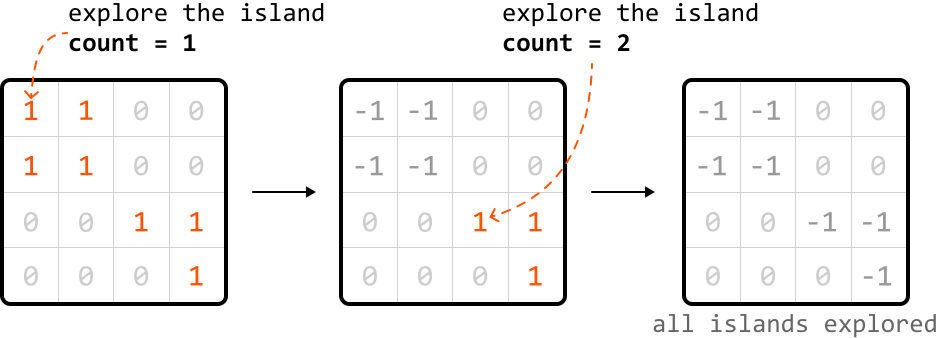
Implementation
To traverse the matrix 4-directionally, we can use an array of direction vectors:
dirs = [(-1, 0), (1, 0), (0, -1), (0, 1)]
Each pair in the array represents the changes needed to move one step in a specific direction:
![Image represents a visual explanation of how to move in four directions (Up, Down, Left, Right) on a 2D grid using array indexing. The left side shows four equations, each representing a directional movement. Each equation takes a coordinate pair (r, c) representing the row and column of a cell and adds it to an element from a dirs array. dirs[0] corresponds to moving Up, resulting in (r - 1, c); dirs[1] corresponds to moving Down, resulting in (r + 1, c); dirs[2] corresponds to moving Left, resulting in (r, c - 1); and dirs[3] corresponds to moving Right, resulting in (r, c + 1). The right side displays a 3x3 grid visually illustrating these movements. The central cell is highlighted in light gray and labeled (r, c), representing the starting point. The surrounding cells are labeled with their respective coordinates, showing the result of applying the directional equations. The grid demonstrates the effect of adding the dirs array elements to the initial coordinate (r, c) to obtain the new coordinates after moving in a specific direction.](/courses/coding-patterns/images/count-islands-10.svg)
from typing import List

def count_islands(matrix: List[List[int]]) -> int:
if not matrix:
return 0
count = 0
for r in range(len(matrix)):
for c in range(len(matrix[0])): # If a land cell is found, perform DFS to explore the full island, and # include this island in our count.
if matrix[r][c] == 1:
dfs(r, c, matrix)
count += 1
return count

def dfs(r: int, c: int, matrix: List[List[int]]) -> None: # Mark the current land cell as visited.
matrix[r][c] = -1 # Define direction vectors for up, down, left, and right.
dirs = [(-1, 0), (1, 0), (0, -1), (0, 1)] # Recursively call DFS on each neighboring land cell to continue exploring this # island.
for d in dirs:
next_r, next_c = r + d[0], c + d[1]
if is_within_bounds(next_r, next_c, matrix) and matrix[next_r][next_c] == 1:
dfs(next_r, next_c, matrix)

def is_within_bounds(r: int, c: int, matrix: List[List[int]]) -> bool:
return 0 <= r < len(matrix) and 0 <= c < len(matrix[0])
function countIslands(matrix) {
if (!matrix || matrix.length === 0) {
return 0;
}
let count = 0;
for (let r = 0; r < matrix.length; r++) {
for (let c = 0; c < matrix[0].length; c++) {
// If a land cell is found, perform DFS to explore the full island, and
// include this island in our count.
if (matrix[r][c] === 1) {
dfs(r, c, matrix);
count += 1;
}
}
}
return count;
}
function dfs(r, c, matrix) {
// Mark the current land cell as visited.
matrix[r][c] = -1;
// Define direction vectors for up, down, left, and right.
const dirs = [
[-1, 0],
[1, 0],
[0, -1],
[0, 1],
];
// Recursively call DFS on each neighboring land cell to continue exploring this
// island.
for (const d of dirs) {
const nextR = r + d[0];
const nextC = c + d[1];
if (isWithinBounds(nextR, nextC, matrix) && matrix[nextR][nextC] === 1) {
dfs(nextR, nextC, matrix);
}
}
}
function isWithinBounds(r, c, matrix) {
return 0 <= r && r < matrix.length && 0 <= c && c < matrix[0].length;
}
Complexity Analysis
Time complexity: The time complexity of count_islands is O(m⋅n)O(m\cdot n)O(m⋅n), where mmm denotes the number of rows and nnn denotes the number of columns. This is because each cell of the matrix is visited at most twice: once when searching for land cells in the count_islands function, and up to one more time during DFS.
Space complexity: The space complexity is O(m⋅n)O(m\cdot n)O(m⋅n) mostly due to the recursive call stack during DFS, which can grow up to m⋅nm\cdot nm⋅n in size.
Interview Tip
Tip: Check with an interviewer if modifications to the input are acceptable.
During DFS, we marked cells as visited by modifying the input directly. However, in some situations, input modification may not be desirable. As such, it’s worth confirming this with the interviewer before making in-place modifications to the input.