Rightmost Nodes of a Binary Tree
Return an array containing the values of the rightmost nodes at each level of a binary tree.
Example:
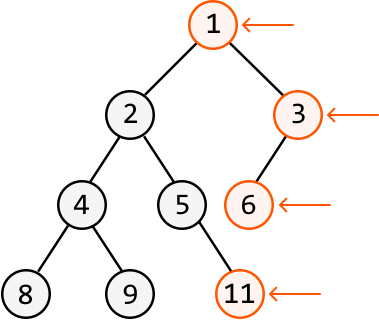
Output: [1, 3, 6, 11]
Intuition
At first glance, the solution to this problem might seem as simple as traversing the rightmost branch of the tree until we reach a leaf node. But this doesn’t work. Why not? Consider the tree below. We see that traversing just the rightmost branch results in missing the rightmost node at the fourth level of the tree:
![Image represents a binary tree with nodes labeled numerically (1, 2, 3, 4, 5, 6, 8, 9, 11). Nodes 1, 3, and 6 are shaded gray and enclosed within a dashed oval, indicating a subset of the tree. Arrows indicate a traversal path from node 1 to node 3, and then to node 6. Node 11 is circled in red and a horizontal arrow points to it from the text 'missing,' highlighting its absence from the 'output' list. To the right, the 'output' is listed as [1 3 6], while the 'expected output' is [1 3 6 11], demonstrating that the algorithm represented by the tree traversal only produced a subset of the expected values, specifically omitting node 11. The tree structure shows a hierarchical relationship between the nodes, with node 1 as the root, and nodes 2 and 3 as its children. Node 2 has children 4 and 5, and node 4 has children 8 and 9. Node 3 has a child node 6, and node 5 has a child node 11.](/courses/coding-patterns/images/rightmost-nodes-of-a-binary-tree-2.svg)
This means we need to consider the entire tree to attain the correct output, and not just a single branch. What would be useful is a way to traverse the tree level by level, allowing us to identify and retrieve the last (i.e., rightmost) node at each level.
We know BFS traverses nodes level by level. However, standard BFS doesn’t provide explicit markers for when one level ends and another begins. In contrast, there is a type of BFS traversal that allows us to process one level at a time. This algorithm is called level-order traversal.
Level-order traversal
The core idea of level-order traversal is that at any level of the tree, the children of the nodes at that level comprise the next level. This means the children of level 1’s nodes make up level 2, and likewise, the children of level 2’s nodes make up level 3, and so on. To see how this works, consider the binary tree below, with the BFS queue initialized with the tree’s root node:
![Image represents a tree-like data structure, specifically a binary tree, on the left, and a queue data structure on the right. The binary tree is composed of circular nodes, each containing a single integer from 1 to 11. Node 1 is the root node, branching into nodes 2 and 3. Node 2 further branches into nodes 4 and 5, while node 3 connects to node 6. Node 4 branches into nodes 8 and 9, and node 5 connects to node 11. The connections between nodes represent parent-child relationships. On the right, a queue is depicted as queue = [1], indicating that the queue currently contains only the integer 1, enclosed in square brackets. There is no visible connection or information flow between the tree and the queue; they are presented as separate structures.](/courses/coding-patterns/images/rightmost-nodes-of-a-binary-tree-3.svg)
We know level 1 consists of only the root node. So, the children of the root make up the nodes of the second level. Let’s pop the root node off and then add its children to the queue:
![Image represents a visual explanation of Breadth-First Search (BFS) algorithm applied to a binary tree. The left side shows a binary tree with a root node labeled '1' (highlighted in peach), a left child node '2', and a right child node '3'. The nodes '2' and '3' have dashed lines indicating they might have further children, but these are not shown. A label 'Level 1:' precedes the root node. An arrow points from a rectangular box labeled 'node' to the root node '1', suggesting data flow into the algorithm. The right side demonstrates the algorithm's process. A queue, initially containing only node '1' (in a solid circle), is shown. A red arrow and the text 'node = queue.pop' indicate that node '1' is dequeued. Two blue arrows, labeled 'push node.left' and 'push node.right', show the left and right children ('2' and '3', respectively, in dashed circles) being enqueued into the queue, expanding the queue to '[2, 3]'. This illustrates the step-by-step process of BFS: visiting nodes level by level, adding children to the queue as they are encountered.](/courses/coding-patterns/images/rightmost-nodes-of-a-binary-tree-4.svg)
Since we’ve removed the only level 1 node from the queue and added its children, the queue now only contains the nodes of level 2. Therefore, the size of the queue currently corresponds to the number of nodes in level 2.
![Image represents a visual explanation of a breadth-first search (BFS) algorithm using a tree structure and a queue. A tree is shown with a root node labeled '1', connected to two child nodes labeled '2' and '3' at level 2. These child nodes are highlighted with a light peach-colored background, and the label 'Level 2:' is placed to their left. Dashed lines extend from nodes '2' and '3', suggesting further child nodes at subsequent levels, not explicitly shown. To the right, a queue is depicted as queue = [2 3], indicating that nodes '2' and '3' are currently in the queue for processing. A light gray, dashed-line box below states 'size of queue = size of level 2', illustrating the relationship between the number of nodes in the queue and the number of nodes at the current level being processed in the BFS traversal.](/courses/coding-patterns/images/rightmost-nodes-of-a-binary-tree-5.svg)
The current queue size is 2, indicating the second level has 2 nodes. So, let’s pop off the next 2 nodes in the queue and add their children to the queue:
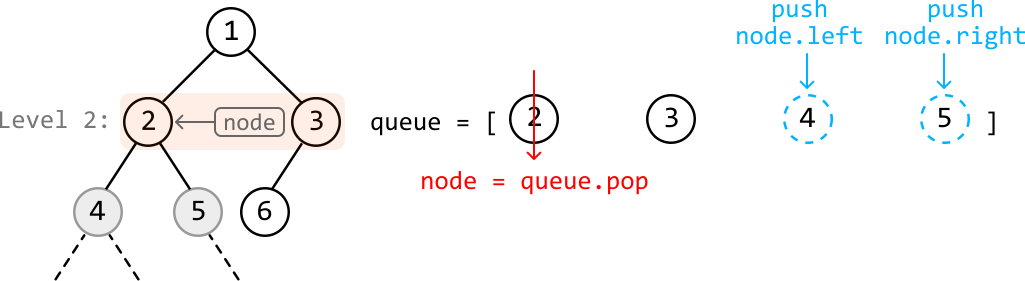
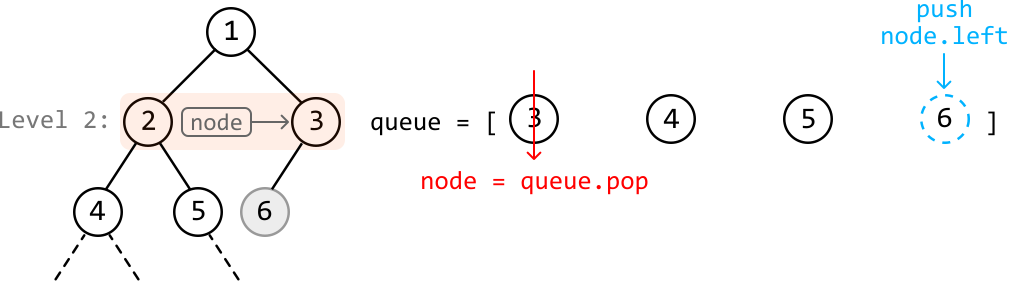
After the two nodes on the second level have been popped off the queue, the remaining nodes in the queue represent the third level.
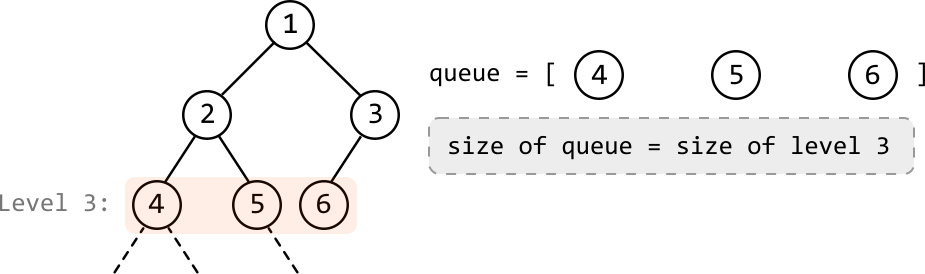
The size of the queue is 3, meaning that to process the third level, we must process the next 3 nodes.
To summarize this process, we start by placing the root node in the queue, where the root node represents the first level. Then, begin BFS by entering a while-loop that continues until the queue is empty, meaning all nodes in the tree have been visited. For level-order traversal:
-
Determine the level size: Collect the current size of the queue (
level_size) to find the number of nodes in the current level. Initially, the queue will only contain the root node, indicating the first level is of size 1. -
Process the current level: For each node at this level, pop it from the queue and add its children to the queue.
After processing all nodes of the current level, the queue contains all the nodes of the next level. Repeat steps 1 and 2 to process the next level. When the queue is empty, all levels have been processed.
Once we know how to traverse the tree level by level, the rightmost node at each level is obtained by collecting that level’s last node:
![Image represents a tree-like structure illustrating a coding pattern, possibly related to tree traversal or data collection. The tree has four levels, labeled 'Level 1,' 'Level 2,' 'Level 3,' and 'Level 4.' Each level contains nodes represented by circles, with numbers inside. Nodes 1, 3, 6, and 11 are highlighted with an orange border. Downward-pointing arrows indicate a traversal path, starting from node 1, then proceeding to nodes 3, 6, and finally 11. The nodes are connected by lines representing parent-child relationships. To the right, a list res = [1 3 6 11] shows the values collected during this traversal, suggesting that the algorithm collects values from the orange-highlighted nodes. The unhighlighted nodes (2, 4, 5, 8, 9) are part of the tree structure but are not included in the final result shown in the res list.](/courses/coding-patterns/images/rightmost-nodes-of-a-binary-tree-9.svg)
Implementation
Python
JavaScript
Java

from ds import TreeNode

def rightmost_nodes_of_a_binary_tree(root: TreeNode) -> List[int]:
    if not root:
        return []
    res = []
    queue = deque([root])
    while queue:
        level_size = len(queue)
        # Add all the non-null child nodes of the current level to the queue.
        for i in range(level_size):
            node = queue.popleft()
            if node.left:
                queue.append(node.left)
            if node.right:
                queue.append(node.right)
            # Record this level's last node to the result array.
            if i == level_size - 1:
                res.append(node.val)
    return res

Complexity Analysis
Time complexity: The time complexity of rightmost_nodes_of_a_binary_tree is O(n)O(n)O(n), where nnn denotes the number of nodes in the tree. This is because we process each node of the tree once during the level-order traversal.
Space complexity: The space complexity is O(n)O(n)O(n) due to the space taken up by the queue. The queue’s size will grow as large as the level with the most nodes. In the worst case, this occurs at the final level when all the last-level nodes are non-null, totaling approximately n/2n/2n/2 nodes. Note that the res array does not contribute to the space complexity.