Markdown lesson 118 total lessons

Introduction to Backtracking

Stay in the lesson flow with grouped chapter navigation on the left and markdown content optimized for long reading sessions.

Introduction to Backtracking

Intuition

Imagine you’re stuck at an intersection point in a maze, and you know one of the three routes ahead leads to the exit:
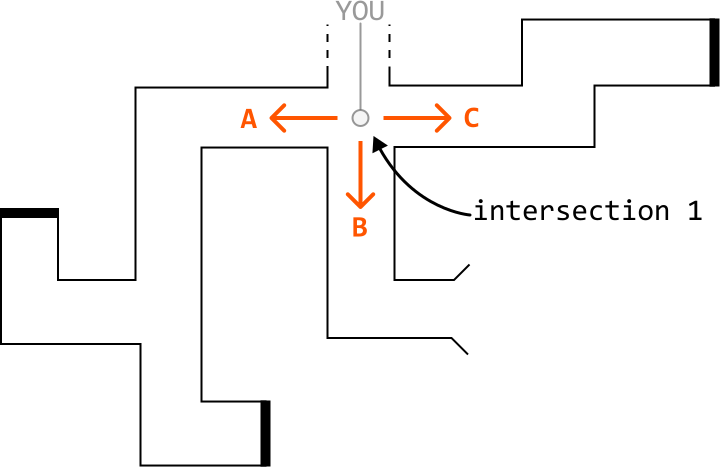
Image represents a flowchart illustrating a coding pattern, possibly related to decision-making or control flow.  The central element is a small, light gray circle labeled 'YOU,' representing a decision point.  Three orange arrows emanate from this circle: one labeled 'A' pointing left, one labeled 'C' pointing right, and one labeled 'B' pointing downwards. These arrows represent different possible paths or code branches.  The paths extend into a maze-like structure of black lines, forming distinct routes for each branch.  A curved black arrow connects the downward path 'B' to a point on the right labeled 'intersection 1,' suggesting a merging or joining of paths later in the process. The overall structure resembles a simplified representation of code execution, where 'YOU' is the decision point, A, B, and C are different code blocks or functions, and the lines represent the flow of execution, potentially highlighting the concept of conditional statements and their impact on the program's path.

However, you’re not sure which route to take. To find the exit, you decide to try each option one by one, starting with option A. As you walk through passage A, you encounter a new intersection containing two more routes, D and E:
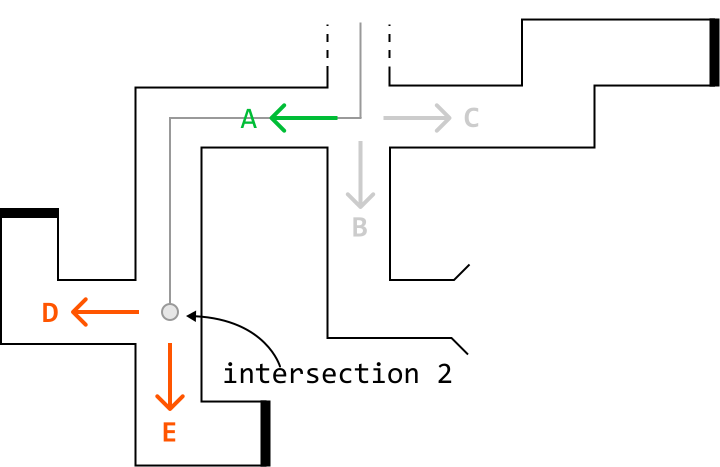
Image represents a flowchart depicting a control flow through a series of labeled points (A, B, C, D, E) connected by lines indicating the direction of flow.  A central intersection is highlighted, labeled 'intersection 2,' where a small, light gray circle represents a decision point.  From this circle, a curved arrow points to the right, indicating a possible path.  A thick, green arrow points left from point A to the intersection, while a light gray arrow points right from the intersection to point C.  A light gray arrow points downwards from the intersection to point B.  From the circle, a thick, orange arrow points downwards to point E, and another thick, orange arrow points left to point D.  The lines form a complex path, with some segments forming rectangular shapes, suggesting different code blocks or processes. The overall structure resembles a maze, illustrating the branching and merging of control flow within a program.

You try option D, but it leads to a dead end. So, you backtrack to the second intersection point:
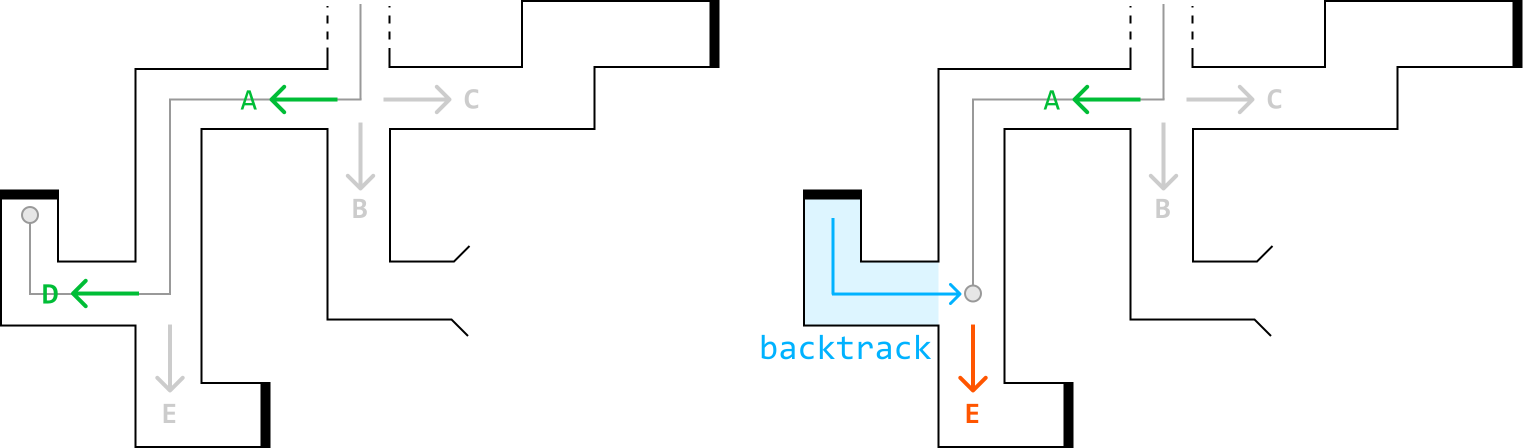
The image represents a visual explanation of a backtracking algorithm, likely within the context of pathfinding or maze traversal.  It shows two nearly identical diagrams depicting a maze-like structure with labeled nodes (A, B, C, D, E) connected by pathways.  The left diagram illustrates a forward traversal, showing a green arrow moving from D to A, then a grey arrow from A to C, and a grey arrow downwards to B.  The right diagram shows the same initial path but highlights a backtracking step.  A light-blue shaded L-shaped section indicates the path taken before backtracking. A bright-blue arrow shows the backtracking movement from a point near B back to a point near E. An orange arrow then points downwards from this point to node E, representing the next step in the algorithm after backtracking.  The overall structure is a series of interconnected rectangular boxes representing different states or locations within the algorithm's search space.  The arrows indicate the flow of the algorithm, with green arrows representing the initial forward movement and blue and orange arrows representing the backtracking and subsequent steps.

Next, you try option E, but it also leads to a dead end, so you backtrack to the second junction point. After concluding that neither path D nor E works, you backtrack again to the first intersection point:
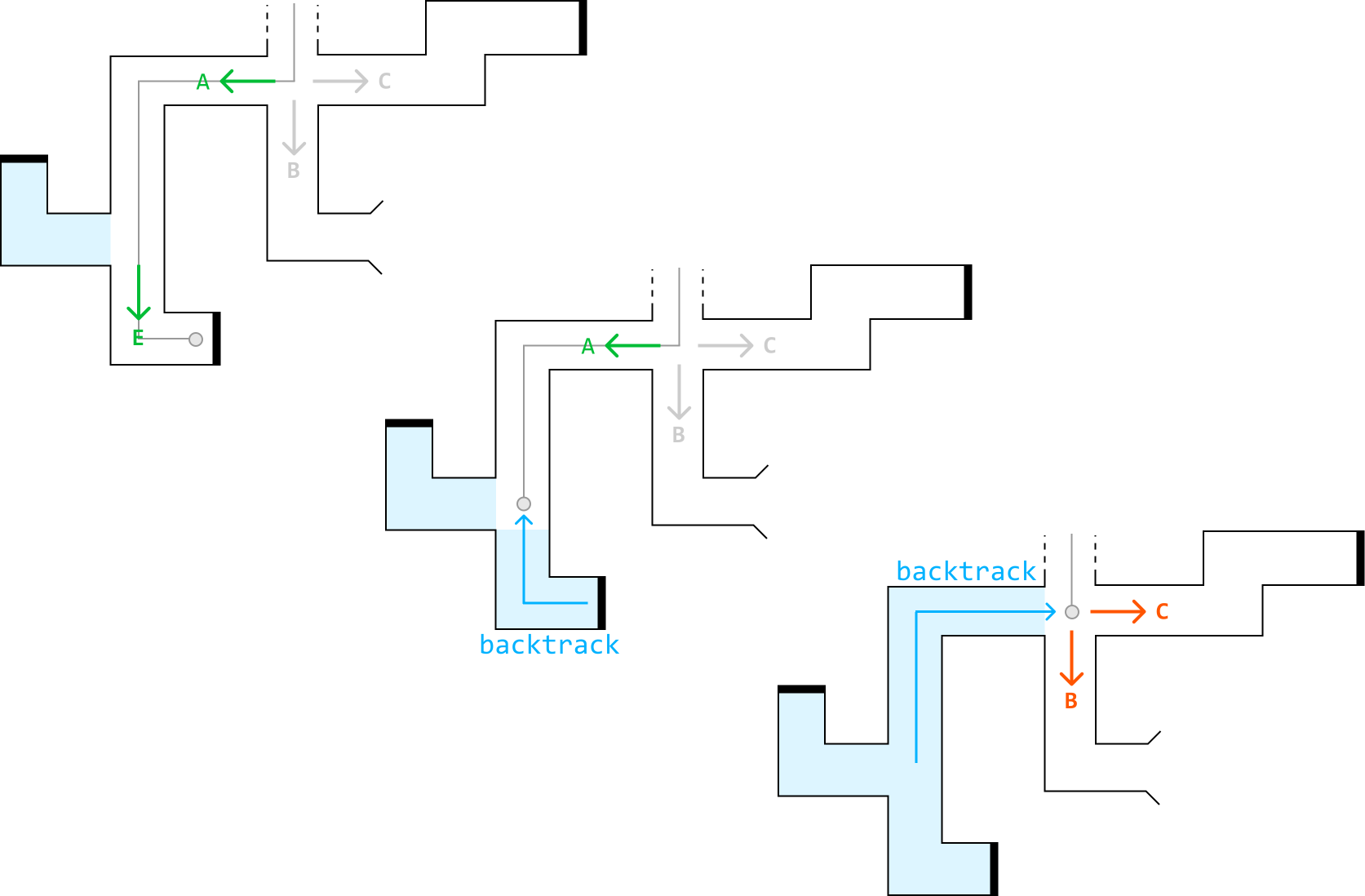
Image represents a visual depiction of a backtracking algorithm navigating a maze-like structure.  The diagram shows two instances of a path-finding process. The top half illustrates a forward traversal: a light-blue path starts from the left, moves downwards labeled 'E', then upwards and right, reaching a junction labeled 'A', 'B', and 'C'. A green arrow indicates a choice is made to proceed from 'A' to 'C'. The bottom half shows the backtracking process.  A light-blue path again starts from the left, but this time, after reaching a junction similar to the top half, it proceeds along a path labeled 'backtrack' (in light-blue text) using a light-blue upward arrow. This backtrack path leads to a point where a different path is explored, indicated by an orange arrow moving towards 'C'.  Both halves feature a similar maze structure with paths represented by lines, junctions, and a small circle representing the current position of the algorithm.  The labels 'A', 'B', and 'C' denote decision points within the maze, while 'E' marks a starting point in the top half. The 'backtrack' labels highlight the reversal of the path taken during the backtracking phase.

Having determined that path A doesn’t lead to the exit, you move on to path B and discover that it leads to the exit:
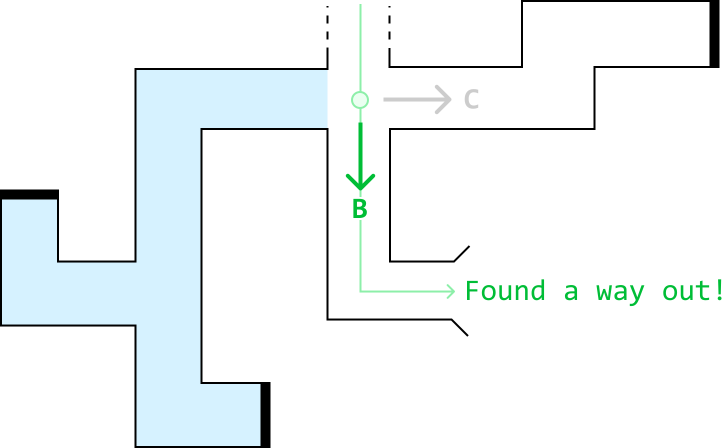
Image represents a maze-like structure illustrating a pathfinding algorithm.  A light-blue, L-shaped area represents the explored portion of the maze, with thicker black lines defining the maze walls.  A green circle marks a decision point within the maze. From this point, a light-green arrow points right, labeled 'C', indicating a possible path. A thicker, downward-pointing green arrow leads to a point labeled 'B', representing a choice made by the algorithm.  From point B, another light-green arrow points right towards the maze exit, labeled 'Found a way out!', indicating a successful path discovery. The overall arrangement shows the algorithm's progression through the maze, starting from an implied entry point (the top of the L-shape) and ending at the exit, highlighting the path taken and the exploration of alternative routes (represented by the 'C' path).

This brute force process of testing all possible paths and backtracking upon failure is called ‘backtracking.’

State space tree
In backtracking, the state space tree, also known as the decision tree, is a conceptual tree constructed by considering every possible decision that can be made at each point in a process.

For example, here’s how we would represent the state space tree for the maze scenario:
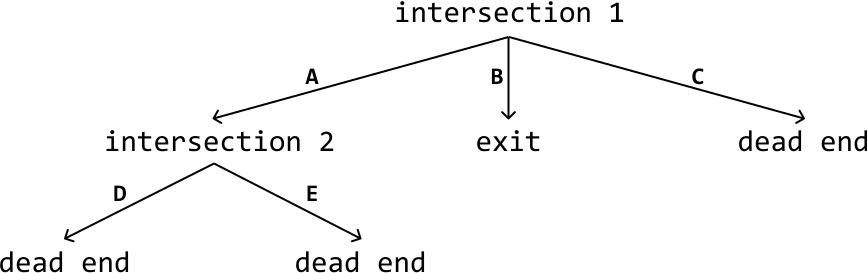
Image represents a tree-like diagram illustrating a coding pattern, possibly related to decision-making or pathfinding.  The top node is labeled 'intersection 1,' from which three branches extend downwards. The leftmost branch, labeled 'A,' points to a node labeled 'intersection 2.'  'Intersection 2' has two further branches, labeled 'D' and 'E,' both leading to terminal nodes labeled 'dead end.' The central branch from 'intersection 1,' labeled 'B,' points directly to a terminal node labeled 'exit.' The rightmost branch from 'intersection 1,' labeled 'C,' also points to a terminal node labeled 'dead end.'  The arrows on the branches indicate the direction of flow, suggesting a sequential process where decisions are made at each intersection point, leading to either a successful exit or a dead end.

Here’s a simplified explanation of a state space tree:

  • Edges: Each edge represents a possible decision, move, or action.

  • Root node: The root node represents the initial state or position before any decisions are made.

  • Intermediate nodes: Nodes representing partially completed states or intermediate positions.

  • Leaf nodes: The leaf nodes represent complete or invalid solutions.

  • Path: A path from the root to any leaf node represents a sequence of decisions that lead to a complete or invalid solution.

Drawing out the state space tree for a problem helps to visualize the entire solution space, and all possible decisions. In addition, it’s a great way to understand how the algorithm works. By figuring out how to traverse this tree, we essentially create the backtracking algorithm.

Backtracking algorithm
Traversing the state space tree is typically done using recursive DFS. Let’s discuss how it’s implemented at a high level.

Termination condition: Define the condition that specifies when a path should end. This condition should define when we’ve found a valid and/or invalid solution.

Iterate through decisions: Iterate through every possible decision at the current node, which contains the current state of the problem. For each decision:

  1. Make that decision and update the current state accordingly.

  2. Recursively explore all paths that branch from this updated state by calling the DFS function on this state.

  3. Backtrack by undoing the decision we made and reverting the state.

Below is a crude template for backtracking:

Python

JavaScript

Java

SVG Image

def dfs(state):
    # Termination condition.
    if meets_termination_condition(state):
        process_solution(state)
        return
    # Explore each possible decision that can be made at the current state.
    for decision in possible_decisions(state):
        make_decision(state, decision)
        dfs(state)
        undo_decision(state, decision)  # Backtrack.

Analyzing time complexity

Analyzing the time complexity of backtracking algorithms involves understanding the branching factor and the depth of the state space tree:

  • Branching factor: The number of children each node has. It typically represents the maximum number of decisions that can be made for a given state.

  • Depth: The length of the deepest path in the state space tree. It corresponds to the number of decisions or steps required to reach a complete solution.

The time complexity is often estimated as O(b⋅d)O(b\cdot d)O(b⋅d), where bbb denotes the branching factor and ddd denotes the depth. This is because in the worst case, every node at each level of the tree needs to be explored during a typical backtracking algorithm.

When to use backtracking
Backtracking is useful when we need to explore all possible solutions to a problem. For example, if we need to find all possible ways to arrange items, or generate all possible subsets, permutations, or combinations, backtracking can help to identify every possible solution.

Real-world Example

AI algorithms for games: backtracking is used in AI algorithms for games like chess and Go to explore possible moves and strategies. The programs examine each potential move, simulate the game’s progression, and evaluate the outcome. If a move leads to an unfavorable position, the program will backtrack to the previous move and try alternative options, systematically exploring the game tree until it finds the optimal strategy.

Chapter Outline
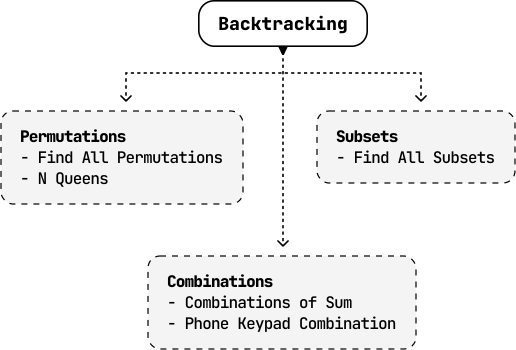
Image represents a hierarchical diagram illustrating the application of the 'Backtracking' coding pattern.  At the top, a rounded rectangle labeled 'Backtracking' serves as the root node.  Three dashed-line rounded rectangles branch down from it. The leftmost rectangle is labeled 'Permutations' and lists two sub-problems: 'Find All Permutations' and 'N Queens.' The rightmost rectangle is labeled 'Subsets' and contains the sub-problem 'Find All Subsets.'  A third rectangle, positioned below 'Backtracking' and connected to it by a dashed line, is labeled 'Combinations' and lists 'Combinations of Sum' and 'Phone Keypad Combination' as its sub-problems.  The arrangement shows that 'Permutations,' 'Subsets,' and 'Combinations' are all problem types that can be solved using the backtracking algorithm, with the diagram visually representing this relationship.