First and Last Occurrences of a Number
Given an array of integers sorted in non-decreasing order, return the first and last indexes of a target number. If the target is not found, return [-1, -1] .
Example 1:
Input: nums = [1, 2, 3, 4, 4, 4, 5, 6, 7, 8, 9, 10, 11],
       target = 4
Output: [3, 5]
Explanation: The first and last occurrences of number 4 are indexes 3 and 5, respectively.
Intuition
A brute-force solution to this problem involves a linear search to find the first and last occurrences of the target number. However, since the array is sorted, we can try searching for these two occurrences using binary search.
The challenge of using binary search here is that we need to find two separate occurrences of the same number. This means that a standard binary search alone isn’t sufficient.
To help us find a solution, it’s important to understand that the problem is effectively asking us to find the lower and upper bound of a number in the array:
![Image represents a sequence of integers from 1 to 11, displayed in two rows. The top row shows the integers [1, 2, 3, 4, 4, 4, 5, 6, 7, 8, 9, 10, 11], with the three consecutive '4's highlighted in a light peach/orange rectangle. The bottom row displays the corresponding indices, ranging from 0 to 12. Two orange downward-pointing arrows connect the bottom row to labels below. The arrow originating from index 3 points to the label 'lower bound,' and the arrow originating from index 5 points to the label 'upper bound,' indicating that the highlighted sequence of three '4's starts at the lower bound (index 3) and ends at the upper bound (index 5).](/courses/coding-patterns/images/first-and-last-occurrences-of-a-number-1.svg)
This indicates we can solve this problem in two main steps:
- Perform a binary search to find the lower bound of the target.
- Perform a binary search to find the upper bound of the target.
Lower-bound binary search
To find the start position of the target, let’s first define the search space. The target could be anywhere in the array, so the search space should encompass all the array’s indexes.
Next, let’s figure out how to narrow the search space. At each point in the binary search, there are three conditions to consider based on the midpoint value:
- when it’s greater than the target
- when it’s less than the target
- when it’s equal to the target
In each of these cases, think about where the target is in relation to the midpoint. Note that we’re effectively looking for the leftmost occurrence of the target value.
Midpoint value is greater than the target
If the midpoint value is greater, it means the target is to the left of this number. So, narrow the search space toward the left.
When we do this, we can exclude the midpoint from the search space (i.e., right = mid - 1) because its value is not equal to the target:
![Image represents a visual depiction of a step within a binary search algorithm or a similar search/sorting process operating on a numerical array. The array nums is displayed horizontally, with elements [1, 2, 3, 4, 4, 4, 5, 6, 7, 8, 9, 10, 11]. Index values are shown below each element (0-12). Three labeled pointers, 'left', 'mid', and 'right', indicate array boundaries or positions. 'left' points to the beginning of the array (index 0), 'right' points to the end (index 12), and 'mid' points to element 4 at index 3 (highlighted in light green). A dashed box below the array displays a conditional statement: nums[mid] > 4. An arrow indicates that if this condition is true, then the 'right' pointer is updated to right = mid - 1, effectively narrowing the search space to the left half of the array. The visual arrangement clearly shows the pointers' positions and how the condition affects the 'right' pointer's movement, illustrating a key step in a divide-and-conquer approach to searching or sorting.](/courses/coding-patterns/images/first-and-last-occurrences-of-a-number-2.svg)

Midpoint value is less than the target
If the midpoint value is smaller, it means the target is to the right of this number. So, narrow the search space toward the right. Again, we can exclude the midpoint from the search space (i.e., left = mid + 1) because its value is not equal to the target:
![Image represents a visual depiction of a binary search algorithm's step. Three labeled boxes, 'left,' 'mid,' and 'right,' point downwards to respective indices within a numbered array [1, 2, 3, 4, 4, 4, 5, 6, 7, 8, 9, 10, 11]. The array's indices are shown below the numbers, ranging from 0 to 12. 'left' points to index 0 (value 1), 'mid' points to index 2 (value 3), highlighted in light green, and 'right' points to index 5 (value 4). A dashed box at the bottom displays the condition nums[mid] < 4, which evaluates to true because 3 < 4. An arrow indicates this condition leads to the assignment left = mid + 1, updating the 'left' index to 3 (the next index after 'mid'). The visual emphasizes the iterative process of narrowing down the search space within the array based on the comparison of the middle element with the target value (implicitly 4).](/courses/coding-patterns/images/first-and-last-occurrences-of-a-number-4.svg)

Midpoint value is equal to the target
Now is when things get interesting. When the midpoint value is equal to the target, there are two possibilities:
- This is the lower bound of the target value.
- This is not the lower bound, so the lower bound is somewhere further to the left.
We don’t know which possibility is true at the moment, so we should narrow the search space toward the left to continue looking for the lower bound, while also including the midpoint itself in the search space (i.e., right = mid).
![Image represents a visual depiction of a binary search algorithm step. At the top, three rectangular boxes labeled 'left,' 'mid' (highlighted in light blue), and 'right' indicate index pointers. Arrows descend from each box, pointing to a numbered sequence [1, 2, 3, 4, 4, 4, 5, 6, 7, 8, 9, 10, 11] displayed below. The numbers are positioned above their corresponding indices (0-12) shown in a lighter gray. The 'mid' pointer points to the value '4' at index 4. A light green circle highlights the '4' at index 3, visually representing the 'left' pointer's position. The 'right' pointer also points to a '4' at index 5. At the bottom, a dashed-line box displays the code snippet 'nums[mid] == 4 → right = mid,' illustrating the algorithm's logic: if the value at the middle index ('nums[mid]') equals the target value (4), then the 'right' pointer is updated to the 'mid' index. This signifies that the search space has been narrowed down.](/courses/coding-patterns/images/first-and-last-occurrences-of-a-number-6.svg)

Continue this reasoning for the next midpoint as it’s also equal to the target:
![Image represents a visual depiction of a binary search algorithm step. A numbered array [1, 2, 3, 4, 4, 4, 5, 6, 7, 8, 9, 10, 11] is shown with indices displayed below. Three labeled boxes, 'left,' 'mid,' and 'right,' represent pointers to array elements. A light-green circle highlights the element at index 3, which is the value 4, indicating the current 'mid' point. Arrows point from 'left' and 'right' to the 'mid' element, showing how these pointers converge. Below the array, a code snippet 'nums[mid] == 4 → right = mid' illustrates the algorithm's logic: if the value at the midpoint ('nums[mid]') equals the target value (4), the 'right' pointer is updated to the current 'mid' index, effectively narrowing the search space to the left half of the array for the next iteration.](/courses/coding-patterns/images/first-and-last-occurrences-of-a-number-8.svg)

The final value, once the left and right pointers meet, is the lower bound of the target.
Upper-bound binary search
There’s a lot of similarity between this and lower-bound binary search. For starters, the search space is identical. Additionally, the cases when the midpoint value is greater than or less than the target are handled the same. This makes sense because, in both binary searches, we’re seeking the same target value. So, when the midpoint value is not equal to the target, the actions we take will be the same as the actions taken in the lower-bound binary search.
The difference in logic occurs when the midpoint is equal to the target, as we’re now looking for the rightmost value of the target, instead of the leftmost value. As such, let’s just focus on the logic for when the midpoint value is equal to the target.
Midpoint value is equal to the target
Similar to lower-bound binary search, there are two possibilities: either this is the upper bound, or it’s not. Again, we’re not sure which is true. So, let’s narrow the search space toward the right to continue looking for an upper bound while including the midpoint in the search space (i.e., left = mid):
![Image represents a visual depiction of a binary search algorithm step. At the top, three rectangular boxes labeled 'left,' 'mid' (highlighted in light blue), and 'right' are shown. Arrows descend from each box, pointing to elements within a numbered array represented horizontally below. The array, indexed from 0 to 12, contains the numbers [1, 2, 3, 4, 4, 4, 5, 6, 7, 8, 9, 10, 11]. The 'left' arrow points to the number 4 at index 3, the 'mid' arrow points to the number 4 at index 4, and the 'right' arrow points to the number 4 at index 5 (highlighted in light green). At the bottom, a gray dashed box displays the code snippet 'nums[mid] == 4 -> left = mid,' indicating that because the value at the middle index ('mid') is equal to 4, the 'left' index is updated to equal the 'mid' index. This illustrates a step in the binary search where the target value (4) has been found at the middle index, resulting in an update of the search space.](/courses/coding-patterns/images/first-and-last-occurrences-of-a-number-10.svg)

When we continue this logic for the next midpoint values, we notice something peculiar happen:
![Image represents a visual depiction of a binary search algorithm step. A numbered array [1, 2, 3, 4, 4, 5, 6, 7, 8, 9, 10, 11] is shown, with indices displayed below. Above the array, three rectangular boxes labeled 'left,' 'mid,' and 'right' represent pointers or indices within the array. A light-green circle highlights the element at index 4 (value 4). Arrows point from 'left' and 'right' to this highlighted element, indicating the current midpoint of the search. Below the array, a code snippet 'nums[mid] == 4 → left = mid' shows that the value at the midpoint (nums[mid]) is 4, and consequently, the 'left' pointer is updated to equal the 'mid' pointer. This suggests the algorithm is searching for a value (likely 4), and this step shows the narrowing of the search space by updating the 'left' pointer.](/courses/coding-patterns/images/first-and-last-occurrences-of-a-number-12.svg)

![Image represents a visual depiction of a binary search algorithm step. At the top, three rectangular boxes labeled 'left,' 'mid,' and 'right' represent index pointers within a sorted numerical array shown below. The array, depicted as a number line from 0 to 12, contains the numbers 1 through 11. A light green circle highlights the element at index 4, which holds the value 4. Light blue arrows point from 'mid' to this highlighted element, indicating that the midpoint of the search is currently at index 4. Below the array, a dashed box displays the code snippet 'nums[mid] == 4 -> left = mid,' illustrating that because the value at the midpoint (nums[mid]) equals the target value (4), the 'left' pointer is updated to equal the 'mid' pointer. This signifies that the search has successfully found the target value at the midpoint.](/courses/coding-patterns/images/first-and-last-occurrences-of-a-number-14.svg)
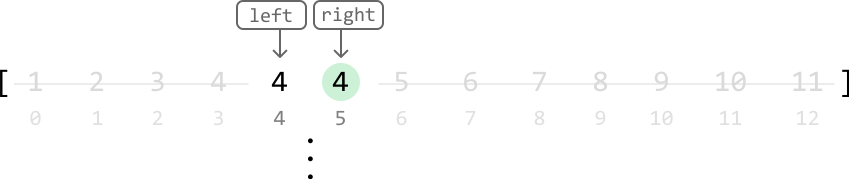
It looks like we just got stuck in an infinite loop, where the position of the
left pointer keeps getting set to mid when they’re both at the same index. Why
does this happen?
Debugging the infinite loop
When the left and right pointers are directly next to each other, mid ends up being positioned where the left pointer is:

Since one of our operations is left = mid, we get stuck in an infinite loop where left and mid are continuously set to each other’s positions, which means progress cannot be made. The reason this wasn’t a problem during lower-bound binary search was that we never had left = mid as an operation in the logic. One way to avoid this issue is by biasing the midpoint to the right.
When the midpoint is biased to the right, we avoid an infinite loop during upper-bound binary search.
-
We no longer need to worry about the left pointer since
midis now being positioned at the right pointer when the search space has two elements. -
We won’t encounter any infinite loops with the right pointer because it never gets set to the midpoint’s position, as we use
right = mid - 1.
A right bias of the midpoint can be achieved using mid = (left + right) // 2 + 1:

Now, performing left = mid allows us to properly narrow the search space.
As a general rule, in upper-bound binary search, we should bias
midto the right.
Let’s apply this change to the same example and see what happens:
![Image represents a visual depiction of a step within a binary search algorithm. At the top, three rectangular boxes labeled 'left,' 'mid' (highlighted in light blue), and 'right' are shown. Arrows descend from each box, pointing to elements within a numbered array visualized horizontally below. The array contains the numbers 1 through 11, with indices displayed below. The 'left' arrow points to the number 4 at index 3, the 'mid' arrow points to the number 4 at index 4, and the 'right' arrow points to the number 4 at index 5 (highlighted in light green). At the bottom, a dashed-line box displays the code snippet 'nums[mid] == 4 → left = mid,' indicating that because the value at the middle index ('mid') of the array is equal to 4, the 'left' index is updated to be equal to the 'mid' index. This illustrates a key step in the binary search where the search space is narrowed based on the comparison of the middle element with the target value.](/courses/coding-patterns/images/first-and-last-occurrences-of-a-number-18.svg)
![Image represents a visual depiction of a step within a binary search algorithm. A numbered array, indexed from 0 to 12, is shown with values implicitly represented by their index positions. The array segment from index 0 to 12 is displayed. Three labeled boxes, 'left' (orange), 'mid' (cyan), and 'right' (gray), represent index pointers. Arrows indicate that 'left' and 'right' initially point to indices 3 and 5 respectively, while 'mid' points to index 4. A light green circle highlights the element at index 4, which has a value of 4. A dashed orange arrow shows a tentative movement of the 'left' pointer. A solid cyan arrow shows the movement of the 'mid' pointer. A separate box displays the condition nums[mid] == 4 -> left = mid, indicating that because the element at the midpoint (index 4) equals 4, the 'left' pointer is updated to the value of the 'mid' pointer (index 4). This illustrates a step where the target value is found at the midpoint, resulting in the update of the 'left' pointer.](/courses/coding-patterns/images/first-and-last-occurrences-of-a-number-19.svg)

As we can see, we’ve avoided an infinite loop, with the left and right pointers meeting at the upper bound of the target.
If the target doesn’t exist
The last step in both algorithms is to check that the final values located are equal to the target. If the target does not exist in the array, the final values in both binary search algorithms won’t be equal to the target. In this case, we should return -1.
Implementation
Python
JavaScript
Java

from typing import List

def first_and_last_occurrences_of_a_number(nums: List[int], target: int) -> List[int]:
    lower_bound = lower_bound_binary_search(nums, target)
    upper_bound = upper_bound_binary_search(nums, target)
    return [lower_bound, upper_bound]

def lower_bound_binary_search(nums: List[int], target: int) -> int:
    left, right = 0, len(nums) - 1
    while left < right:
        mid = (left + right) // 2
        if nums[mid] > target:
            right = mid - 1
        elif nums[mid] < target:
            left = mid + 1
        else:
            right = mid
    return left if nums and nums[left] == target else -1

def upper_bound_binary_search(nums: List[int], target: int) -> int:
    left, right = 0, len(nums) - 1
    while left < right:
        # In upper-bound binary search, bias the midpoint to the right.
        mid = (left + right) // 2 + 1
        if nums[mid] > target:
            right = mid - 1
        elif nums[mid] < target:
            left = mid + 1
        else:
            left = mid
    # If the target doesn’t exist in the array, then it's possible that
    # 'left = mid + 1' places the left pointer outside the array when `mid == n - 1`.
    # So, we use the right pointer in the return statement instead.
    return right if nums and nums[right] == target else -1

Complexity Analysis
Time complexity: The time complexity of both the lower_bound_binary_search and upper_bound_binary_search helper functions is O(log(n))O(\log(n))O(log(n)), where nnn is the length of the input array. This is because each function performs a binary search over the entire array. Therefore, first_and_last_occurrences_of_a_number is also O(log(n))O(\log(n))O(log(n)) because it calls each helper function once.
Space complexity: The space complexity is O(1)O(1)O(1).
Interview Tip
Tip: Always test your algorithm.
Binary search can be a tricky algorithm to implement. The best way to uncover unexpected errors is to test your code. The infinite loop encountered during the upper-bound binary search problem is quite easy to miss while designing the algorithm. If you’re unable to recognize this issue during implementation, manual testing can help reveal it. In binary search, an infinite loop can be uncovered when testing a search space that contains just two elements, similar to what we did in the explanation.