Is Palindrome Valid
A palindrome is a sequence of characters that reads the same forward and backward.
Given a string, determine if it’s a palindrome after removing all non-alphanumeric characters. A character is alphanumeric if it’s either a letter or a number.
Example 1:
Input: s = 'a dog! a panic in a pagoda.'
Output: True
Example 2:
Input: s = 'abc123'
Output: False
Constraints:
- The string may include a combination of lowercase English letters, numbers, spaces, and punctuations.
Intuition
Identifying palindromes
A string is a palindrome if it remains identical when read from left to right or right to left. In other words, if we reverse the string, it should still read the same, disregarding spaces and punctuation:

An important observation is that if a string is a palindrome, the first character would be the same as the last, the second character would be the same as the second-to-last, etc:
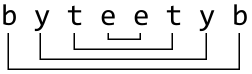
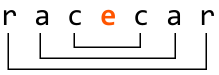
A palindrome of odd length is different because it has a middle character. In this case, the middle character can be ignored since it has no “mirror” character elsewhere in the string.
Palindromes provides an ideal scenario for using two pointers (left and right). By initially setting the pointers at the beginning and end of the string, we can compare the characters at these positions. Ignoring non-alphanumeric characters for the moment, the logic can be summarized as follows:
-
If the alphanumeric characters at
leftandrightare the same, move both pointers inward to process the next pair of characters. -
If not, the string is not a palindrome: return false.
If we successfully compare all character pairs without returning false, the string is a palindrome, and we should return true.
Processing non-alphanumeric characters
Now, let’s explore how to find palindromes that include non-alphanumeric characters.
Since non-alphanumeric characters don’t affect whether a string is a palindrome, we should skip them. This can be achieved with the following approach, which ensures the left and right pointers are adjusted to focus only on alphanumeric characters:
-
Increment
leftuntil the character it points to is alphanumeric. -
Decrement
rightuntil the character it points to is alphanumeric.
With this in mind, let’s check if the string below is a palindrome using all the information we know so far:
![Image represents a diagram illustrating a coding pattern, possibly related to array or string manipulation. Two orange rectangular boxes labeled 'left' and 'right' are positioned above a line of text 'a + 2 c ! 2 a'. Arrows descend from each box, pointing to the respective ends of this text string. Below, a light-grey, dashed-bordered rectangle contains the conditional statement 's[left] == s[right]', which checks for equality between elements at indices 'left' and 'right' of an array or string 's'. A right-pointing arrow follows this condition, leading to the consequent action 'left += 1, right -= 1', indicating that the 'left' index is incremented and the 'right' index is decremented. The overall diagram suggests an algorithm that iterates through a sequence from both ends, comparing elements until a mismatch is found or the indices cross.](/courses/coding-patterns/images/is-palindrome-valid-4.svg)
![Image represents a diagram illustrating a coding pattern. At the top, two orange rectangular boxes labeled 'left' and 'right' are shown. A downward-pointing arrow extends from each box. Below the boxes, a string 'a + 2 c ! 2 a' is displayed. The 'left' arrow points to the 'a + 2' portion of the string, and the 'right' arrow points to the 'c ! 2 a' portion. A light gray, dashed-bordered rectangle contains the text 's[left] is not alphanumeric → left += 1,' indicating a conditional statement. This statement checks if the character at the index specified by the variable left within string s is not alphanumeric. If the condition is true, the value of left is incremented by 1. The arrow within the gray rectangle visually represents the flow of control based on the condition's outcome.](/courses/coding-patterns/images/is-palindrome-valid-5.svg)
![Image represents a diagram illustrating a coding pattern, possibly related to string manipulation or array processing. At the top, two orange rectangular boxes labeled 'left' and 'right' are shown. Arrows descend from each box pointing to a string 'a + 2 c ! 2 a'. This string appears to be the input data, with 'left' pointing to the 'a + 2' segment and 'right' pointing to the '2 a' segment. Below the input string, a light gray, dashed-bordered rectangle contains the core logic: 's[left] == s[right] → left += 1, right -= 1'. This expression signifies a comparison: if the element at index 'left' in string 's' is equal to the element at index 'right', then the 'left' index is incremented by 1, and the 'right' index is decremented by 1. This suggests an algorithm that iterates from both ends of the string, comparing elements until a mismatch is found or the indices cross. The arrow ('→') indicates the conditional action taken upon successful comparison.](/courses/coding-patterns/images/is-palindrome-valid-6.svg)
![Image represents a diagram illustrating a coding pattern, specifically a conditional assignment. At the top, two rectangular boxes labeled 'left' and 'right' (in orange) are shown. Downward arrows from these boxes point to a string 'a + 2 c ! 2 a'. This string appears to represent an input, with 'left' pointing to 'a + 2 c' and 'right' pointing to '! 2 a'. Below this, a light gray, dashed-bordered rectangle contains the conditional statement: 's[right] is not alphanumeric → right -= 1'. This statement indicates that if the substring referenced by s[right] (which is '! 2 a' in this example) is not alphanumeric, then the value of the variable right is decremented by 1. The arrow ('→') signifies the conditional flow, showing the consequence of the condition being met. The diagram visually demonstrates how the 'right' variable's value might change based on the content of the input string.](/courses/coding-patterns/images/is-palindrome-valid-7.svg)

As shown above, when the left and right pointers meet, it signals our exit condition. When these pointers meet, we’ve reached the middle character of the palindrome, at which point we can exit the loop since the middle character doesn’t need to be evaluated. However, we need to keep in mind that exiting when left equals right won’t always be sufficient as an exit condition. For example, if the number of alphanumeric characters is even, the pointers won’t meet. This can be observed below:
![Image represents a diagram illustrating a coding pattern, possibly related to string manipulation or palindrome checking. At the top, two orange rectangular boxes labeled 'left' and 'right' are shown. Arrows point downwards from these boxes to a sequence of characters 'a b b a' below. This sequence appears to be a string being processed. A light gray, dashed-bordered rectangle contains the core logic: 's[left] == s[right] → left += 1, right -= 1'. This expression indicates a comparison: the character at index left in string s is compared to the character at index right. If they are equal (indicated by '=='), then the left index is incremented by 1 ('left += 1') and the right index is decremented by 1 ('right -= 1'). This suggests an iterative approach, moving inwards from both ends of the string, likely to check for palindromic properties. The arrow ('→') signifies the conditional execution of the index updates based on the comparison result.](/courses/coding-patterns/images/is-palindrome-valid-9.svg)
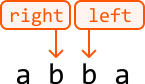
Therefore, we need to ensure we exit the loop when left equals right, or when left passes right. In other words, the algorithm continues while left is less than right:
while left < right:
Implementation
In Python, we can use the inbuilt isalnum method to check if a character is alphanumeric.
Python
JavaScript
Java

def is_palindrome_valid(s: str) -> bool:
    left, right = 0, len(s) - 1
    while left < right:
        # Skip non-alphanumeric characters from the left.
        while left < right and not s[left].isalnum():
            left += 1
        # Skip non-alphanumeric characters from the right.
        while left < right and not s[right].isalnum():
            right -= 1
        # If the characters at the left and right pointers don’t match, the string is
        # not a palindrome.
        if s[left] != s[right]:
            return False
        left += 1
        right -= 1
    return True

Complexity Analysis
Time complexity: The time complexity of is_palindrome_valid is O(n)O(n)O(n), where nnn denotes the length of the string. This is because we perform approximately nnn iterations using the two-pointer technique.
Space complexity: We only allocated a constant number of variables, so the space complexity is O(1)O(1)O(1).
Test Cases
In addition to the examples discussed, below are more examples to consider when testing your code.
| Input | Expected output | Description |
|---|---|---|
s = "" | True | Tests an empty string. |
s = "a" | True | Tests a single-character string. |
s = "aa" | True | Tests a palindrome with two characters. |
s = "ab" | False | Tests a non-palindrome with two characters. |
s = "!, (?)" | True | Tests a string with no alphanumeric characters. |
s = "12.02.2021" | True | Tests a palindrome with punctuation and numbers. |
s = "21.02.2021" | False | Tests a non-palindrome with punctuation and numbers. |
s = "hello, world!" | False | Tests a non-palindrome with punctuation. |
Interview Tips
Tip 1: Clarify problem constraints.
It’s common to not receive all the details of a problem from an interviewer. For example, you might only be asked to “check if a string is a palindrome.” But before diving into a solution, it’s important to clarify details with the interviewer, such as the presence of non-alphanumeric characters, their treatment, the role of numbers, the case sensitivity of letters, and other relevant details.
Tip 2: Confirm before using significant in-built functions.
This problem is made easier by using in-built functions such as .isalnum (or equivalent). Before using an in-built function that simplifies the implementation, ask the interviewer if it’s okay to use it, or if they would prefer you implement it yourself.
The interviewer will most likely allow the use of an in-built function, or ask you to implement it as an exercise for later in the interview. If you use an in-built function, make sure you understand its time and space complexity.
Remember that interviewers are looking for team players, and this shows them you’re considerate of their preferences and can adapt your approach based on the requirements.