Largest Square in a Matrix
Determine the area of the largest square of 1’s in a binary matrix.
Example:
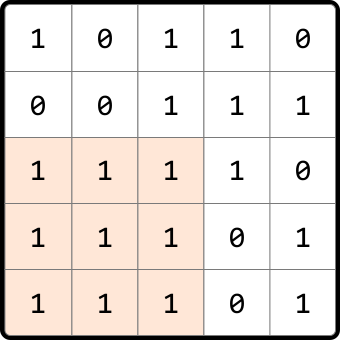
Output: 9
Intuition
The brute force solution to this problem involves examining every possible submatrix within the given matrix to determine if it forms a square of 1s. This can be done by treating each cell as a potential top-left corner of a square, and checking all possible squares that extend from that cell. For each of these squares, we’ll need to verify that all cells within the square are 1’s. Repeating this process for each cell allows us to find the largest square. This process is quite inefficient, so let’s explore alternatives.
One important thing to understand is that squares contain smaller squares inside them. This indicates that subproblems might exist in this problem. Let’s see if we can find what the subproblems are and how we can use them. Consider the following 6x6 matrix containing a 4×4 square of 1s:
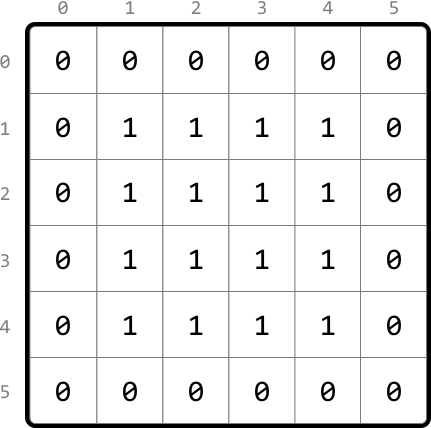
Let’s say we’re at cell (4, 4). We know just by looking at the matrix that a square of length 4 with all 1s ends at this cell, but what information would we need algorithmically to determine that this 4x4 exists? A key observation here is that there are three 3×3 squares around this cell:
- one that ends directly to the left of the current cell (4, 3).
- one that ends at the top-left diagonal of the current cell (3, 3).
- one that ends directly above the current cell (3, 4).
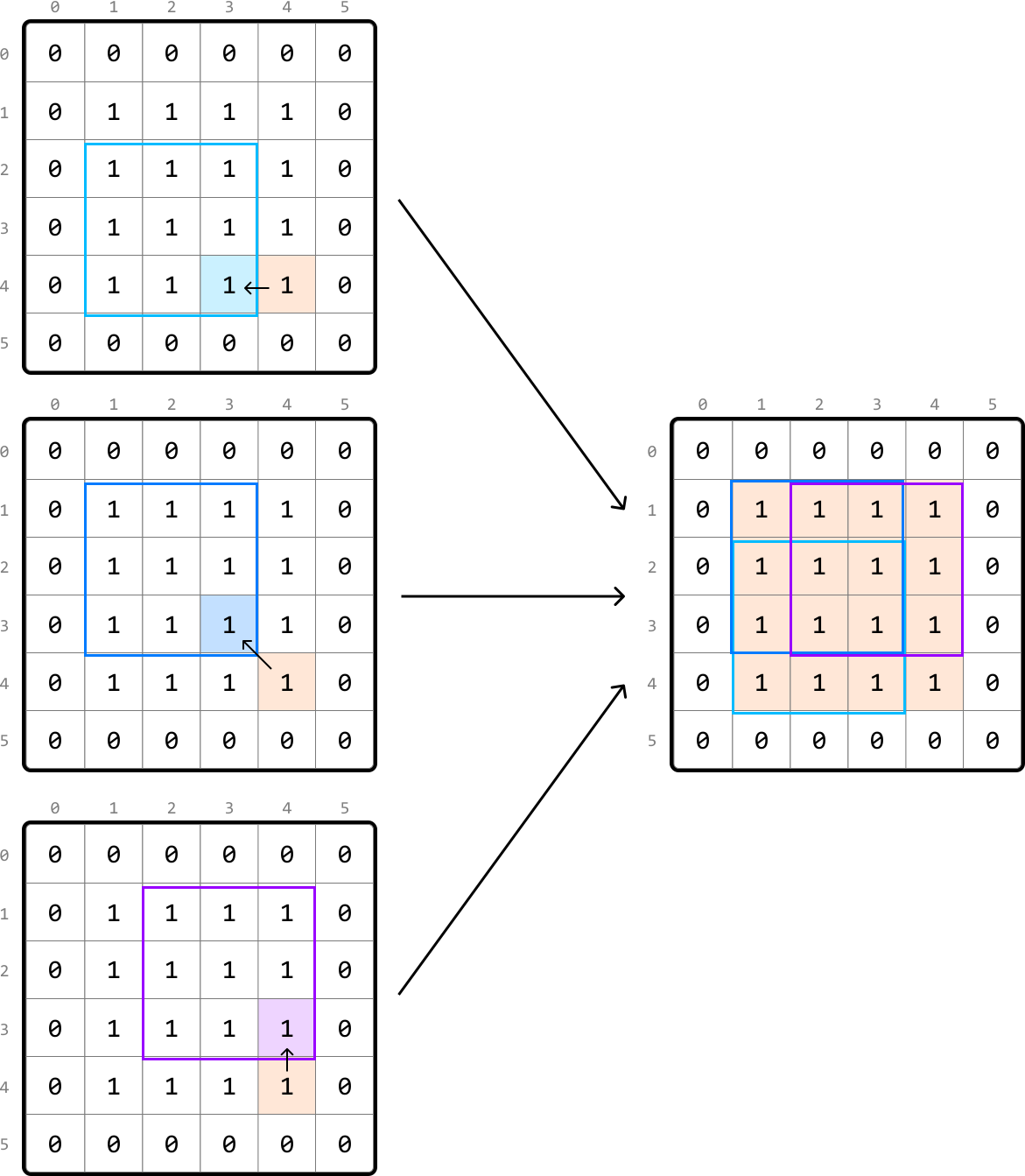
This more clearly highlights the existence of subproblems: the length of a square that ends at the current cell depends on the lengths of the squares that end at its left, top, and top-left neighboring cells.
Let’s consider a slightly different scenario, where this time, the input matrix contains one less 1, meaning there’s no longer a 4×4 square of 1s:
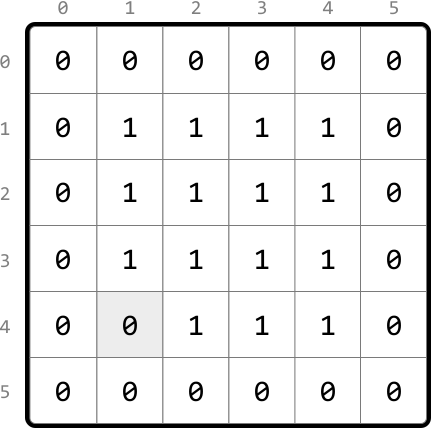
Let’s see if our strategy of checking the three neighboring squares around the current cell (4, 4) changes at all here. Keep in mind that this time, the square that ends directly to the left of the current cell only has a length of 2. This means the square that ends at the current cell can, at most, have a length of 3, with 1 unit from the current cell and 2 units from the smallest neighboring square:
![Image represents a step-by-step visualization of a 2D array processing algorithm, likely demonstrating a sliding window or kernel operation. Three 6x6 matrices are shown, each representing a stage in the process. The matrices contain only 0s and 1s. In the first matrix, a 2x2 region (cells [3,2] to [4,3]) is highlighted with a light blue border. An arrow points from the cell [3,3] to [4,3], suggesting data movement or processing. The second matrix shows the light blue region shifted one position to the right, now encompassing cells [3,3] to [4,4], with a new light blue region. A similar arrow points from [3,4] to [4,4]. The third matrix shows a larger, 3x3 region (cells [1,2] to [3,4]) highlighted with a purple border, encompassing the previous light blue regions, suggesting an accumulation or aggregation of results. Arrows connect the matrices, indicating the sequential nature of the algorithm. The row and column indices (0-5) are labeled along the top and left side of each matrix, providing spatial context. The overall diagram illustrates a pattern of iterative processing across a 2D array, possibly for tasks like image filtering or feature extraction.](/courses/coding-patterns/images/largest-square-in-a-matrix-5.svg)
This indicates that the length of the current square is restricted by the smallest of its three neighboring squares. We can express this as a recursive formula where matrix[i][j] represents the value of the current cell, (i, j):
if matrix[i][j] == 1: max_square(i, j) = 1 + min(max_square(i - 1, j), max_square(i - 1, j - 1), max_square(i, j - 1))
We now have all the information we need. Given this problem has an optimal substructure, we can translate the above recurrence relation directly into a DP formula.
if matrix[i][j] == 1: dp[i][j] = 1 + min(dp[i - 1][j], dp[i - 1][j - 1], dp[i][j - 1])
Now, let’s think about what the base cases should be.
Base cases
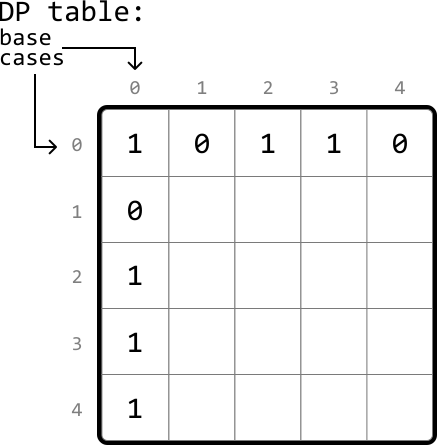
We know dp[0][0] should be 1 if matrix[0][0] is 1 since the top-left cell can only have a square of length 1.
What other base cases are there? Consider row 0 and column 0 of the matrix. These are special because the length of a square ending at any of these cells is at most 1.
So, for the base cases, we can set all cells in row 0 and column 0 to 1 in our DP table, provided those cells in the original matrix are also 1:
Populating the DP table
We populate the DP table starting from the smallest subproblems (excluding the base cases). Specifically, with row 0 and column 0 populated, we begin by populating cell (1, 1) and work our way down to the last cell (m - 1, n - 1) row by row, where m and n are the dimensions of the matrix:
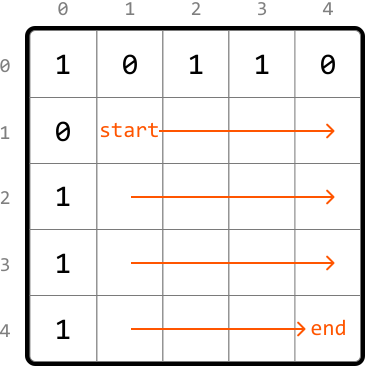
The largest value in the DP table represents the length of the largest square in our matrix. Therefore, we just need to track the maximum DP value (max_len) as we populate the table. Once done, we just return max_len^2, which represents the area of the largest square.
Implementation
In this implementation, it’s possible to merge the base case handling with the code which populates the DP table. However, in an interview setting, code is often easier to understand when the base cases are defined separately, which is why they are implemented separately here.
Python
JavaScript
Java

def largest_square_in_a_matrix(matrix: List[List[int]]) -> int:
    if not matrix:
        return 0
    m, n = len(matrix), len(matrix[0])
    dp = [[0] * n for _ in range(m)]
    max_len = 0
    # Base case: If a cell in row 0 is 1, the largest square ending there has a
    # length of 1.
    for j in range(n):
        if matrix[0][j] == 1:
            dp[0][j] = 1
            max_len = 1
    # Base case: If a cell in column 0 is 1, the largest square ending there has
    # a length of 1.
    for i in range(m):
        if matrix[i][0] == 1:
            dp[i][0] = 1
            max_len = 1
    # Populate the rest of the DP table.
    for i in range(1, m):
        for j in range(1, n):
            if matrix[i][j] == 1:
                # The length of the largest square ending here is determined by
                # the smallest square ending at the neighboring cells (left,
                # top-left, top), plus 1 to include this cell.
                dp[i][j] = 1 + min(dp[i - 1][j], dp[i - 1][j - 1], dp[i][j - 1])
            max_len = max(max_len, dp[i][j])
    return max_len ** 2

Complexity Analysis
Time complexity: The time complexity of largest_square_in_a_matrix is O(m⋅n)O(m\cdot n)O(m⋅n) because each cell of the DP table is populated once.
Space complexity: The space complexity is O(m⋅n)O(m\cdot n)O(m⋅n) since we’re maintaining a 2D DP table that has m⋅nm\cdot nm⋅n elements.
Optimization
We can optimize our solution by realizing that, for each cell in the DP table, we only need to access the cell directly above it, the cell to its left, and the top-left diagonal cell.
-
To get the cell above it or the top-left diagonal cell, we only need access to the previous row.
-
To get the cell to its left, we just need to look at the cell to the left of the current cell in the same row we’re populating.
Therefore, we only need to maintain two rows:
prev_row: the previous row.curr_row: the current row being populated.
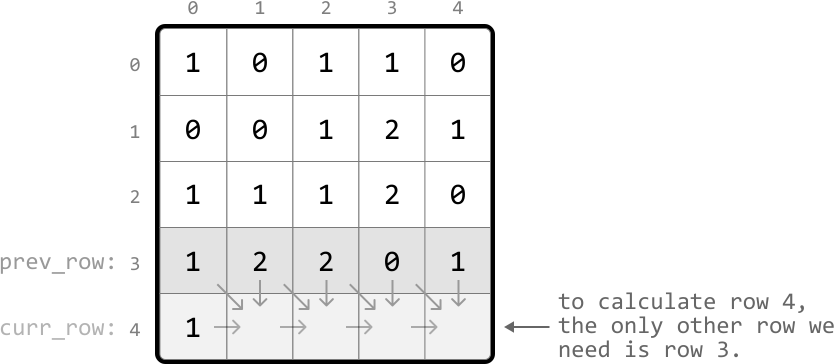
This effectively reduces the space complexity to O(m)O(m)O(m). Below is the optimized code:
Python
JavaScript
Java

def largest_square_in_a_matrix_optimized(matrix: List[List[int]]) -> int:
    if not matrix:
        return 0
    m, n = len(matrix), len(matrix[0])
    prev_row = [0] * n
    max_len = 0
    # Iterate through the matrix.
    for i in range(m):
        curr_row = [0] * n
        for j in range(n):
            # Base cases: if we're in row 0 or column 0, the largest square ending
            # here has a length of 1. This can be set by using the value in the
            # input matrix.
            if i == 0 or j == 0:
                curr_row[j] = matrix[i][j]
            else:
                if matrix[i][j] == 1:
                      # curr_row[j] = 1 + min(left, top-left, top)
                    curr_row[j] = 1 + min(curr_row[j - 1], prev_row[j - 1], prev_row[j])
            max_len = max(max_len, curr_row[j])
        # Update 'prev_row' with 'curr_row' values for the next iteration.
        prev_row, curr_row = curr_row, [0] * n
    return max_len ** 2