Find the Target in a Rotated Sorted Array
A rotated sorted array is an array of numbers sorted in ascending order, in which a portion of the array is moved from the beginning to the end. For example, a possible rotation of [1, 2, 3, 4, 5] is [3, 4, 5, 1, 2] , where the first two numbers are moved to the end.
Given a rotated sorted array of unique numbers, return the index of a target value. If the target value is not present, return -1.
Example:
Input: nums = [8, 9, 1, 2, 3, 4, 5, 6, 7], target = 1
Output: 2
Intuition
A naive solution is to iterate through the input array until we find the target number. This strategy takes linear time, and doesn’t take into account that the input is a rotated sorted array. Given the array was sorted before it was rotated, we should figure out how binary search might be useful in finding the target.
First, let’s define the search space for the binary search. Since the target value could exist anywhere in the array, the search space should encompass the entire array.
Now, let’s figure out how to narrow the search space, which is an interesting challenge considering the array isn’t perfectly sorted. Let’s work through this by exploring an example:
![Image represents a depiction of a search problem. The top row shows a list of integers, represented as an array [8, 9, 1, 2, 3, 4, 5, 6, 7], enclosed in square brackets. This array is implicitly indexed, with the indices 0 through 8 shown in a smaller font below the corresponding array elements. The text 'target = 1' indicates that the goal is to find the element with the value 1 within the array. The arrangement visually suggests a linear search scenario, where the algorithm would sequentially check each element of the array until it finds the element matching the target value. There are no explicit connections or information flow depicted beyond the visual representation of the array and the target value.](/courses/coding-patterns/images/find-the-target-in-a-rotated-sorted-array-1.svg)
Let’s set left and right pointers at the boundaries of the array and consider the first midpoint value:
![Image represents a visual depiction of array partitioning, likely within the context of a divide-and-conquer algorithm. Three rectangular boxes labeled 'left' (orange), 'mid' (light blue), and 'right' (orange) are positioned above a numerical array [8, 9, 1, 2, 3, 4, 5, 6, 7]. Arrows descend from each box, pointing to the array elements. The 'left' box's arrow points to the first two elements (8 and 9), the 'mid' box's arrow points to the element 3 (the middle element in this example), and the 'right' box's arrow points to the last two elements (6 and 7). The numbers beneath the array (0-8) represent the indices of the array elements. The diagram illustrates how an array is conceptually divided into sections, possibly for recursive processing, with the 'mid' pointer potentially indicating a pivot point or a division boundary.](/courses/coding-patterns/images/find-the-target-in-a-rotated-sorted-array-2.svg)
In a normal sorted array, we’d be able to logically assess whether to search to the left or the right of the midpoint, based solely on the midpoint value and the target. In a rotated sorted array, it’s much less straightforward to determine which side the target value is on.
To decide whether to narrow the search space toward the left or right of the midpoint, let’s visualize the height of each number in the array and pay attention to subarrays [left : mid] and [mid : right] separately. Note, we include the midpoint in both subarrays since the midpoint is used to decide which subarray to narrow the search space towards:
![Image represents a visual depiction of a sorting algorithm, likely merge sort, illustrating the merging of two sorted subarrays. The top section shows an unsorted array [8, 9, 1, 2, 3, 4, 5, 6, 7] divided into three parts: 'left' [8, 9, 1, 2], 'mid' [3], and 'right' [4, 5, 6, 7]. Arrows labeled 'left', 'mid', and 'right' point downwards to their respective subarrays, indicating the input to the merging process. The bottom section displays a bar chart representing the same numbers. The 'left' subarray's bars are taller and unsorted, while the 'right' subarray's bars are shorter, light blue, and sorted in ascending order, as indicated by the label 'ascending' below the chart. The bars visually represent the magnitude of each number. The merging process is implied by the juxtaposition of the sorted 'right' subarray with the unsorted 'left' subarray, suggesting the next step would be to combine them into a single sorted array.](/courses/coding-patterns/images/find-the-target-in-a-rotated-sorted-array-3.svg)
Here, we see the subarray [mid : right] is sorted in ascending order. Since it’s sorted, we know what the smallest and largest numbers in that range are: 3 and 7, respectively. This means we can check if the target is in this subarray by checking if it’s in between 3 and 7. The target (1) is not in this range, so therefore, it must be in the left subarray.
So, we should narrow the search space toward the left, excluding the midpoint (right = mid - 1):
![Image represents a visual depiction of a two-pointer approach in a coding pattern, likely for array traversal or manipulation. A gray rectangular box labeled 'left' points down to a numerical array [8, 9, 1, 2, 3, 4, 5, 6, 7]. Below the array, gray numbers 0 through 8 indicate the indices. An orange rectangular box labeled 'right' points down to the element '2' in the array, signifying its initial position. A dashed orange line curves from the element '2' to the element '7', illustrating a connection or interaction between these two points. The numbers 3, 4, 5, 6, and 7 are shown in gray, indicating they are part of the array but not directly involved in the initial pointer positions. The overall diagram suggests a process where two pointers, one starting at the left and one at a position within the array, interact or move through the array, possibly to find a specific element or perform a comparison.](/courses/coding-patterns/images/find-the-target-in-a-rotated-sorted-array-4.svg)
The reason we excluded the midpoint value was because it wasn’t equal to the target, and so should no longer be considered in the search space.
Let’s continue with the example.
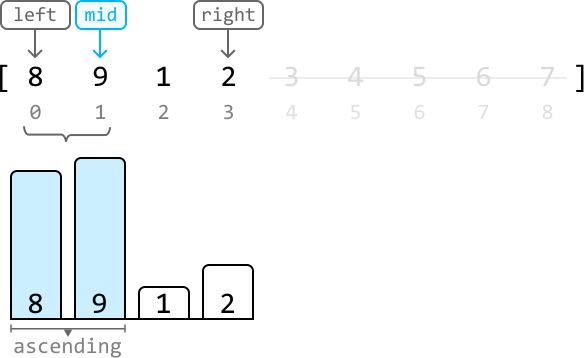
This time, the sorted subarray is the left subarray, [left : mid]. So, we can use this subarray to check where the target value is. Since the target (1) doesn’t fall within the range between 8 and 9, it indicates the target resides in the right subarray. Therefore, we narrow our search space toward the right, excluding the midpoint (left = mid + 1):
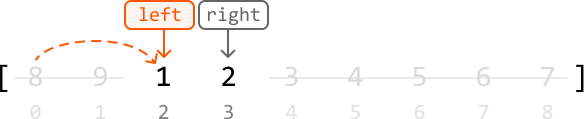
Again, we excluded the midpoint value (9) as it was not equal to the target.
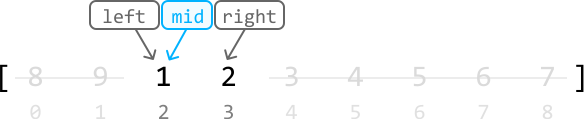
Finally, we’ve found the target at the midpoint, so we can return its index (mid):
Summary
From our discussion above, an important strategy emerges: between the two subarrays, [left : mid] and [mid : right], we can use the sorted one to determine where the target is.
Before examining the subarrays, let’s first compare the target with the value at the midpoint. If they match, we’ve found our target at mid. If not, then we decide where to adjust our search depending on which subarray is sorted, as detailed in the following two test cases:
Case 1: the left subarray, [left : mid], is sorted
- If the target falls in the range of this left subarray, we narrow the search space toward the left.
- Otherwise, we narrow the search space toward the right.
![left:mid) is sorted. The top section shows an initial array [3, 4, 5, 6, 7, 1, 2] represented as bars with their values labeled. Gray boxes labeled ‘left’ and ‘right’ indicate the initial search boundaries. A light-blue box labeled ‘mid’ highlights the middle element (6). A downward-pointing arrow from ‘left’ points to 3, and another from ‘right’ points to 2. A cyan arrow points from ‘mid’ to the element 6. The bottom-left shows pseudocode: if nums[left] <= target < nums[mid] → right = mid - 1 else → left = mid + 1. This logic dictates how the search boundaries (‘left’ and ‘right’) are adjusted based on the target value’s relationship to the middle element. The bottom-right shows two subsequent steps of the algorithm. The first shows the array after the first iteration, with the ‘right’ pointer moved to the element 5. The second shows the array after the second iteration, with the ‘left’ pointer moved to the element 7. Gray curved arrows connect the pseudocode to these steps, illustrating how the algorithm updates the search space based on the condition. The dashed orange lines show the movement of the ‘right’ and ‘left’ pointers across the array during the iterations.](/courses/coding-patterns/images/find-the-target-in-a-rotated-sorted-array-8.svg)
Case 2: the right subarray, [mid : right] is sorted
- If the target falls in the range of this right subarray, we narrow the search space toward the right.
- Otherwise, narrow the search space toward the left.
![Image represents a visual explanation of a coding pattern, specifically a case within a binary search algorithm. The top section shows an array of numbers [6, 7, 1, 2, 3, 4, 5] partitioned into three sections labeled 'left,' 'mid,' and 'right.' The 'mid' section (containing 2) is highlighted in light blue. Arrows indicate the boundaries of these sections. Below this, two further examples illustrate the algorithm's iterative steps. The first shows the 'left' pointer moving to the right, encompassing the 'mid' section, after a comparison. The second example shows the 'right' pointer moving to the left, after a different comparison. A gray box at the bottom contains pseudocode: if nums[mid] < target < nums[right] → left = mid + 1 and else → right = mid - 1. This code describes the conditional logic determining the pointer movement based on the target value's relationship to the values at the 'mid' and 'right' indices. Curved arrows in orange and gray connect the array representations to show the pointer movements ('left' in orange, 'right' in gray) during the algorithm's iterations. The overall diagram demonstrates how the algorithm iteratively narrows the search space by adjusting the 'left' and 'right' pointers until the target is found or the search space is exhausted.](/courses/coding-patterns/images/find-the-target-in-a-rotated-sorted-array-9.svg)
It’s possible to encounter a situation where both subarrays are sorted. In this case, it doesn’t matter which subarray we use to check where the target is.
One final thing to note is that the array might not contain the target value at all. In this case, once the binary search terminates and narrows down to a single value, we need to check if this value is the target. If not, it indicates the target is not present in the array, and we return -1.
Implementation
from typing import List

def find_the_target_in_a_rotated_sorted_array(nums: List[int], target: int) -> int:
left, right = 0, len(nums) - 1
while left < right:
mid = (left + right) // 2
if nums[mid] == target:
return mid # If the left subarray [left : mid] is sorted, check if the target falls in # this range. If it does, search the left subarray. Otherwise, search the # right.
elif nums[left] <= nums[mid]:
if nums[left] <= target < nums[mid]:
right = mid - 1
else:
left = mid + 1 # If the right subarray [mid : right] is sorted, check if the target falls # in this range. If it does, search the right subarray. Otherwise, search the # left.
else:
if nums[mid] < target <= nums[right]:
left = mid + 1
else:
right = mid - 1 # If the target is found in the array, return it’s index. Otherwise, return -1.
return left if nums and nums[left] == target else -1
function find_the_target_in_a_rotated_sorted_array(nums, target) {
let left = 0, right = nums.length - 1;
while (left < right) {
const mid = Math.floor((left + right) / 2);
if (nums[mid] === target) {
return mid;
}
// If the left subarray [left : mid] is sorted, check if the target falls in
// this range. If it does, search the left subarray. Otherwise, search the
// right.
else if (nums[left] <= nums[mid]) {
if (nums[left] <= target && target < nums[mid]) {
right = mid - 1;
} else {
left = mid + 1;
}
}
// If the right subarray [mid : right] is sorted, check if the target falls
// in this range. If it does, search the right subarray. Otherwise, search the
// left.
else {
if (nums[mid] < target && target <= nums[right]) {
left = mid + 1;
} else {
right = mid - 1;
}
}
}
// If the target is found in the array, return it’s index. Otherwise, return -1.
return nums.length && nums[left] === target ? left : -1;
}
Complexity Analysis
Time complexity: The time complexity of find_the_target_in_a_rotated_sorted_array is O(log(n))O(\log(n))O(log(n)) because we’re performing a binary search over an array of length nnn.
Space complexity: The space complexity is O(1)O(1)O(1).