Markdown lesson 118 total lessons

Introduction to Binary Search

Stay in the lesson flow with grouped chapter navigation on the left and markdown content optimized for long reading sessions.

Introduction to Binary Search

Intuition

Let’s say you have a standard, hard-copy English dictionary, and you want to find the definition of the word “inheritance.” How could we do this?

One approach is to flick through it page by page, until reaching the page with “inheritance.” But this is inefficient, and realistically, you’re more likely to immediately open a page somewhere in the middle.

Let’s say you do this and land on a page of words beginning with “M.” Realizing that “inheritance” is somewhere to the left of “M” in the alphabet, you open a page somewhere between the letters “A” and “M.” You continue this process of checking if “inheritance” is to the right or left of the current page, and narrowing the search down until you find the correct page. With this method, you’ve significantly reduced the number of pages to be searched, in contrast to linearly turning every page in order. This is the fundamental concept of binary search.

Image represents a sequential process depicted using three open book icons connected by arrows and a final book with a bookmark. The first book shows multiple lines starting with 'M...', suggesting entries related to 'M'.  An arrow points from this book to the second, with the text 'turn to a page between A and M.' indicating a search or transition. The second book displays lines beginning with 'F...', representing entries related to 'F'. Another arrow, labeled 'turn to a page between F and M.', connects this book to the third. The third book contains lines starting with 'I...', with one line specifically labeled 'Internet' in green, suggesting a search result. Finally, a vertical orange bookmark labeled 'Found it!' is inserted into the third book, signifying the successful completion of the search.  The overall diagram illustrates a search process where the user iteratively narrows down the search space ('M' then 'F') until finding the desired information ('Internet') within a larger dataset represented by the books.

Binary search is an algorithm that searches for a value in a sorted data set.

Even experienced developers can find it quite tricky to implement binary search correctly because “the devil’s in the detail.”

  • How should the boundary variables left and right be initialized?
  • Should we use left < right or left ≤ right as the exit condition in our while-loop?
  • How should the boundary variables be updated? Should we choose left = mid, left = mid + 1, right = mid, or right = mid - 1?

This chapter offers clear, intuitive guidance on how to master these challenges, and confidently handle even the trickiest edge case.

To begin any binary search implementation, do the following:

  1. Define the search space.
  2. Define the behavior inside the loop for narrowing the search space.
  3. Choose an exit condition for the while-loop.
  4. Return the correct value.

Let’s break down these steps.

1. Defining the search space
The search space encompasses all possible values that may include the value we’re searching for. For instance, when searching for a target in a sorted array, the search space should cover the entire array, as the target could be anywhere within it. This is illustrated in the array below, where the left and right pointers define the search space:

Image represents a visual depiction of a search space within a binary search algorithm.  Two orange rectangular boxes labeled 'left' and 'right' are positioned above a horizontal line representing the 'search space'.  This space contains a sorted array of integers: [1, 3, 4, 9, 10, 12, 14, 17, 20].  Arrows descend from 'left' and 'right' pointing to the beginning and end of the array, respectively.  An orange line underneath the array is labeled 'search space,' indicating the range of values currently being considered during the search.  The diagram illustrates the initial state of a binary search, where the algorithm is about to begin its search for a target value within the defined 'search space'.

2. Narrowing the search space
Narrowing the search space involves progressively moving the left or right pointer inward until the search space is reduced to one element or none.

At each point in the binary search, we need to decide how we narrow our search space. We can either:

  • Narrow the search space toward the left (by moving the right pointer inward):

Image represents a diagram illustrating a data structure concept, possibly related to merging or combining data from two sources.  Two orange rectangular boxes labeled 'left' and 'right' are positioned at the top, each pointing downwards with an arrow towards a series of black dots enclosed in square brackets.  The 'left' box points to three black dots, while the 'right' box points to one black dot.  To the right of the 'right' box's black dot, a sequence of three grey dots connected by light grey lines is shown, also enclosed in square brackets. A dashed orange curved arrow originates from the rightmost grey dot and points back towards the black dot associated with the 'right' box, suggesting a connection or data flow from the right-hand sequence back to the initial point. This implies a potential merging or interaction between the data represented by the black dots and the grey dots.

  • Narrow the search space toward the right (by moving the left pointer inward):

Image represents a diagram illustrating a coding pattern, possibly related to data structures or algorithms.  The diagram shows two rectangular boxes labeled 'left' and 'right' in orange, positioned above a horizontal line of elements.  Three grey circles connected by a light grey line represent a sequence on the left side.  To the right of this sequence are three black circles, representing another sequence. An orange dashed curved arrow originates from the leftmost grey circle and extends to the first black circle, indicating a connection or data transfer from the 'left' sequence to the rightmost element of the left sequence. A solid orange arrow points downwards from the 'left' box to the first black circle, suggesting that the 'left' element influences or acts upon this point. Similarly, a solid orange arrow points downwards from the 'right' box to the last black circle, implying an action or influence from the 'right' element on the last black circle.  The entire sequence of circles is enclosed within square brackets, suggesting a defined array or list.

Using the midpoint
We decide whether to move the left or right pointer based on the value in the middle of the search space, indicated by the midpoint variable (mid).

Image represents a visual depiction of a data structure, likely an array or list, being accessed by three pointers labeled 'left,' 'mid,' and 'right.'  The pointers are represented by rectangular boxes with their respective labels in orange ('left,' 'right') and light blue ('mid').  Arrows descend from each pointer, indicating their position within the data structure. The data structure itself is shown as a horizontal row of black dots enclosed in square brackets, representing individual elements. The 'left' pointer points to the first element, the 'right' pointer points to the last element, and the 'mid' pointer points to an element somewhere in the middle.  The arrangement suggests a scenario where these pointers might be used in algorithms like binary search or other operations requiring access to specific array positions.

The main question to ask at each iteration of binary search is: is the value being searched for to the left or the right of the midpoint?

Here’s the general idea: if the value we’re looking for is to the right of the midpoint, narrow the search space toward the right. Otherwise, narrow the search space toward the left.

To narrow the search space towards the right, there are two options:

  • left = mid + 1

Image represents a visual depiction of an algorithm, likely a binary search or a similar divide-and-conquer approach.  The diagram shows two phases. The first phase displays three rectangular boxes labeled 'left' (orange), 'mid' (light blue), and 'right' (orange), each pointing downwards with an arrow to a corresponding position within a sequence of dots representing an array.  The 'left' box points to the beginning of the array, 'mid' to the middle, and 'right' to the end. The second phase shows a transformation.  The initial array is partially redrawn, and a solid arrow with the label 'left = mid + 1' connects the rightmost dot of the left half of the array to the leftmost dot of the right half.  This indicates an update to the 'left' index.  Above the second phase, a light gray 'mid' box and orange 'left' and 'right' boxes are shown, pointing down to a smaller section of the array.  A dashed orange line connects the 'mid' box from the first phase to the 'left' box in the second phase, suggesting a relationship between the midpoint of the initial array and the new starting point of the search in the second phase.  The overall illustration demonstrates how an algorithm iteratively narrows down a search space by updating index pointers based on the midpoint.

We do this if the midpoint value is definitively not the value we’re looking for and should excluded from the search space.

  • left = mid

Image represents a visual depiction of a coding pattern, likely illustrating a divide-and-conquer algorithm or a similar approach to processing data.  The image is divided into two parts. The left part shows three rectangular boxes labeled 'left' (orange), 'mid' (light blue), and 'right' (orange), each pointing downwards with an arrow to a representation of a data array shown as a sequence of black dots within square brackets. The 'left' box points to the beginning of the array, 'mid' to the middle, and 'right' to the end. The right part of the image shows a similar arrangement of 'left', 'mid', and 'right' boxes, but this time the 'left' and 'mid' boxes are connected with arrows to a smaller, processed array (represented by fewer black dots and grey lines connecting them). A solid black arrow connects the initial array (from the left part) to the processed array (in the right part), with the label 'left = mid' written above it.  A dashed orange line connects the 'left' box in the right part to the beginning of the processed array, suggesting a potential recursive call or iterative step.  The 'mid' box in the right part points directly to a point within the processed array, indicating the new midpoint. The 'right' box in the right part points to the end of the processed array. The overall diagram illustrates a process where an array is divided into sub-arrays, processed, and then recombined, possibly to find a specific element or perform a similar operation.

We do this if the midpoint value itself could potentially be the value we’re looking for and should still be included in the search space.

The exclude/include logic applies when narrowing the search space towards the left, as well (i.e., between right = mid - 1 and right = mid).

Calculating the midpoint
In most cases, the midpoint is calculated using mid = (left + right) // 2 in Python.1 To lower the risk of integer overflow, mid = left + (right - left) // 2 is preferred in many other languages.

3. Choosing an exit condition
Choosing an exit condition for when the while-loop should terminate can be tricky. Our choices are primarily between left < right and left ≤ right. Both conditions are applicable in different situations.

  • When the exit condition is left < right, the while-loop will break when left and right meet.2

  • On the other hand, left ≤ right ends once left has surpassed right.

Image represents two diagrams illustrating different loop termination conditions in a search algorithm, likely binary search.  The left diagram shows a loop continuing 'while left < right', terminating 'once left == right'.  Two orange rectangular boxes labeled 'left' and 'right' are positioned above a series of dots within square brackets [...], representing an array or list. Arrows descend from 'left' and 'right' pointing to separate dots within the array, suggesting the pointers are converging. The right diagram shows a loop continuing 'while left ≤ right', terminating 'once left > right'.  Similarly, two orange boxes labeled 'right' and 'left' (note the order change) are above a series of dots within square brackets [...]. Arrows descend from 'right' and 'left', again pointing to separate dots within the array, but this time illustrating the pointers potentially crossing each other before termination.  Both diagrams visually represent the iterative process of narrowing down a search space until a condition is met, highlighting the subtle difference in loop conditions and their impact on the final pointer positions.

When the left and right pointers meet after exiting the left < right condition, both converge to a single value. This is the final value in the search space after the binary search process is complete. This will be the exit condition we use throughout this chapter.

4. Returning the correct value
As previously mentioned, the while-loop terminates once we’ve narrowed the search space down to a final value (assuming no value was returned during earlier iterations), pointed at by both left and right:

Image represents a visual depiction of a data structure, possibly illustrating a binary search or a similar algorithm.  The diagram shows a horizontal line representing a sorted sequence, with several small, grey circles evenly spaced along it, symbolizing data elements.  At the center of the line is a larger, black dot, indicating a pivot or search point. Above this central point are two rectangular boxes, colored orange, labeled 'left' and 'right,' respectively. Arrows point downwards from these boxes to the central black dot, suggesting that the 'left' box represents the portion of the sequence to the left of the pivot, and the 'right' box represents the portion to the right. The entire sequence is bounded by vertical brackets at either end, indicating the limits of the data set.  The arrangement visually communicates the partitioning of a sorted sequence around a pivot point, a common step in divide-and-conquer algorithms.

This final value is the answer we’re looking for, assuming a valid answer exists.

Time Complexity

The time complexity of the binary search is O(log⁡(n))O(\log(n))O(log(n)), where nnn is the number of values in the search space. The algorithm is logarithmic because, in each iteration of the algorithm, it divides the search space in half until a single value is located, or no value is found. This reduction by half in each step is characteristic of logarithmic behavior.

Real-world Example

Transaction search in financial systems: In financial systems, a binary search can be used to quickly find a transaction or record by narrowing down the search range, as the data is typically stored in order. This makes it efficient to retrieve specific entries without searching through the entire database.

Chapter Outline

Binary search has many applications, and we explore a range of problems covering various uses.
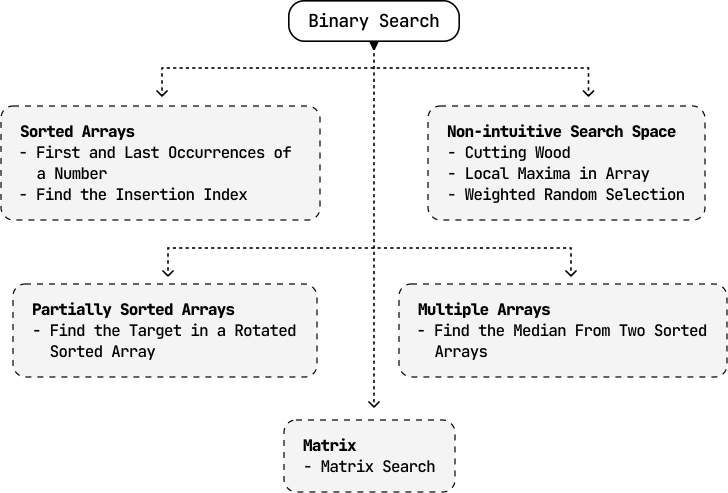
Image represents a flowchart illustrating applications of the Binary Search algorithm.  The topmost box, 'Binary Search,' acts as the root, branching down into two main categories: 'Sorted Arrays' and 'Non-intuitive Search Space.'  The 'Sorted Arrays' box details finding the first and last occurrences of a number and determining the insertion index within a sorted array. This further leads to 'Partially Sorted Arrays,' focusing on finding a target within a rotated sorted array.  The 'Non-intuitive Search Space' box encompasses problems like 'Cutting Wood,' finding 'Local Maxima in Array,' and 'Weighted Random Selection.' This branch connects to 'Multiple Arrays,' which involves finding the median from two sorted arrays. Finally, all paths converge at the bottom to 'Matrix,' which describes the application of binary search to 'Matrix Search.'  The connections between boxes are represented by dashed arrows indicating the flow of problem types stemming from the core Binary Search algorithm.

Footnotes

  1. In rare cases, we calculate the midpoint differently, such as when doing an upper-bound binary search. The details are explained in the First and Last Occurrences of a Number problem.

  2. There are some rare situations where left and right will cross, which is also explored in the First and Last Occurrences of a Number problem.

