Markdown lesson 118 total lessons

Phone Keypad Combinations

Stay in the lesson flow with grouped chapter navigation on the left and markdown content optimized for long reading sessions.

Phone Keypad Combinations

You are given a string containing digits from 2 to 9 inclusive. Each digit maps to a set of letters as on a traditional phone keypad:

12 abc3 def
4 ghi5 jkl6 mno
7 pqrs8 tuv9 wxyz

Return all possible letter combinations the input digits could represent.

Example:

Input: digits = '69'
Output: ['mw', 'mx', 'my', 'mz', 'nw', 'nx', 'ny', 'nz', 'ow', 'ox', 'oy', 'oz']

Intuition

At each digit in the string, we have a decision to make: which letter will this digit represent? Based on this decision, let’s illustrate the state space tree that represents the choices at each digit of the input string.

State space tree
Consider the input string “69”. Let’s start with the root node of the tree, which is an empty string:

Image represents a simplified diagram showing four vertical, rectangular blocks arranged horizontally with small gaps between them.  There are no labels, URLs, parameters, or other textual information present within or around the blocks.  The blocks are all identical in appearance, being solid black rectangles of seemingly equal size and shape.  The arrangement suggests a linear or sequential process, with information potentially flowing from left to right, although no arrows or other indicators of direction or data flow are visible. The image lacks any further detail or context to specify the nature of the blocks or their interaction.

At the first digit, 6, we have the choice of starting our combination with ‘m’, ‘n’, or ‘o’:

Image represents a decision tree illustrating a choice process.  A central node labeled '''' (empty string) branches into three directions.  The top-most branch, labeled 'choose m' in orange text, points left to a terminal node labeled 'm' (representing the character 'm'). The bottom branch, labeled 'choose n' in orange text, points downwards to a terminal node labeled 'n' (representing the character 'n'). The right-most branch, labeled 'choose o' in orange text, points right to a terminal node labeled 'o' (representing the character 'o').  The leftmost node is further labeled 'digit 6: 'm'' indicating that this diagram might be part of a larger process related to digit 6, where 'm' is a possible outcome.  The arrows indicate the flow of information or the decision path taken, with each branch representing a choice between different characters ('m', 'n', or 'o').

For each of these combinations we’ve created, we now have a new decision to make: which letter of digit 9 (‘w’, ‘x’, ‘y’, ‘z’) should we choose? These choices are illustrated below:
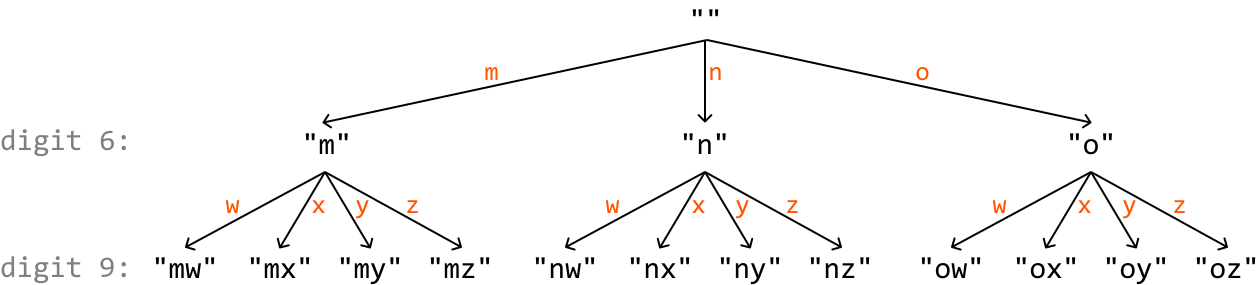
Image represents a tree-like structure illustrating a coding pattern.  The root node is labeled with double quotes (' '), from which three branches extend, each labeled with a single character: 'm' (in orange), 'n' (in orange), and 'o' (in orange). Each of these nodes then branches further into four child nodes, each labeled with a two-character string.  The first character in each child node's label is inherited from its parent node ('m', 'n', or 'o'), while the second character is one of 'w', 'x', 'y', or 'z' (all in orange), resulting in combinations like 'mw', 'mx', 'my', 'mz', 'nw', 'nx', 'ny', 'nz', 'ow', 'ox', 'oy', and 'oz'.  The left side of the image is labeled 'digit 6:' and the bottom left 'digit 9:', suggesting a relationship between the tree structure and these digits, possibly representing a coding scheme where digit 6 maps to the three parent nodes ('m', 'n', 'o') and digit 9 maps to the twelve leaf nodes (the two-character strings).  The arrows indicate the flow of information from parent nodes to their respective children.

One important thing missing from this state space tree is information on which digit we’re making a decision on at each node. We can use an index i to determine which digit we’re considering at each node:
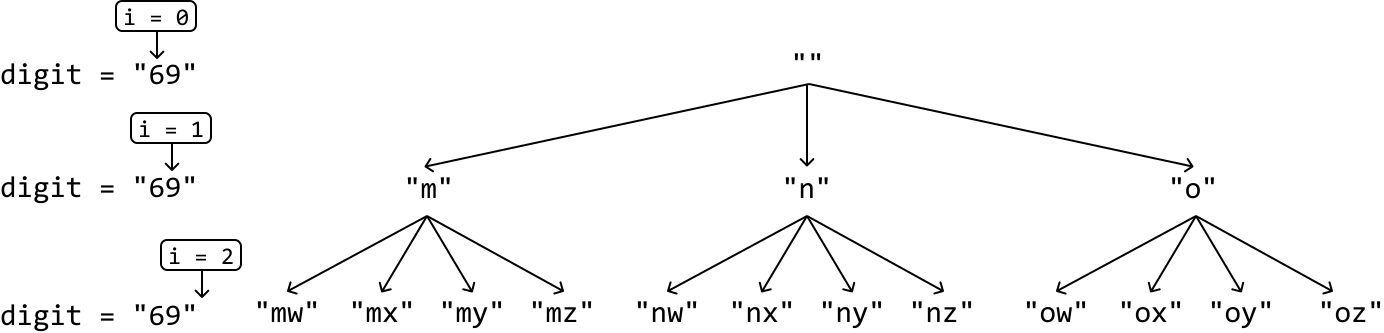
Image represents a tree-like structure illustrating a coding pattern, possibly related to string manipulation or code generation.  The diagram's top shows a root node labeled  “'' representing an initial state. From this root, three branches descend, each labeled with a single character: 'm', 'n', and 'o'. Each of these nodes further branches into four child nodes, each representing a two-character string.  For example, the 'm' node branches into 'mw', 'mx', 'my', and 'mz'. Similarly, 'n' branches into 'nw', 'nx', 'ny', and 'nz', and 'o' branches into 'ow', 'ox', 'oy', and 'oz'.  To the left of the main tree, three separate boxes are shown, each labeled 'i = 0', 'i = 1', and 'i = 2' respectively, with a downward arrow pointing to 'digit = '69'' in each case. This suggests an iterative process where the value of 'i' increments, and the 'digit' remains constant at '69' throughout the iterations. The overall structure suggests a recursive or combinatorial generation of strings based on an initial input ('69') and an iterative counter ('i').

The final level of this decision tree (i.e., when i == n, where n denotes the length of the input string) represents all possible combinations that can be created from the provided string. Similar to our approach in Find All Subsets, let’s use backtracking to obtain these keypad combinations.

Mapping digits to letters
The final thing we need to figure out is a way to determine which letters correspond to which digits. A hash map is great for this purpose. In the hash map, digits are the keys, and the associated sets of letters are their values. This allows us to access the letters in constant time:
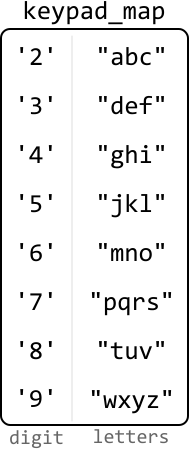
Image represents a table titled 'keypad_map' that maps digits to corresponding letters on a telephone keypad.  The table is divided into two columns. The left column, labeled 'digit' at the bottom, lists the digits '2' through '9', each enclosed in single quotes. The right column, labeled 'letters' at the bottom, shows the corresponding letters associated with each digit on a standard telephone keypad, also enclosed in double quotes.  For example, the digit '2' maps to the letters 'abc', '3' maps to 'def', and so on, up to '9' mapping to 'wxyz'.  There is no explicit information flow depicted; the table simply presents a static mapping between digits and letter combinations.

Implementation

Python

JavaScript

Java

SVG Image

def phone_keypad_combinations(digits: str) -> List[str]:
    keypad_map = {
        '2': 'abc', '3': 'def', '4': 'ghi', '5': 'jkl',
        '6': 'mno', '7': 'pqrs', '8': 'tuv', '9': 'wxyz'
    }
    res = []
    backtrack(0, [], digits, keypad_map, res)
    return res

def backtrack(i: int, curr_combination: List[str], digits: str,
             keypad_map: Dict[str, str], res: List[str]) -> None:
    # Termination condition: if all digits have been considered, add the
    # current combination to the output list.
    if len(curr_combination) == len(digits):
        res.append("".join(curr_combination))
        return
    for letter in keypad_map[digits[i]]:
       # Add the current letter.
        curr_combination.append(letter)
        # Recursively explore all paths that branch from this combination.
        backtrack(i + 1, curr_combination, digits, keypad_map, res)
        # Backtrack by removing the letter we just added.
        curr_combination.pop()

Complexity Analysis

Time complexity: The time complexity of phone_keypad_combinations is O(n⋅4n)O(n\cdot 4^n)O(n⋅4n). This is because the state space tree will branch down until a decision is made for all nnn elements. This results in a tree of height nnn with a branching factor of 4 since there are up to 4 decisions we can make at each digit. For each of the 4n4^n4n combinations created, we convert it into a string and add it to the output list, which takes O(n)O(n)O(n) time per combination. This results in a total time complexity of O(n⋅4n)O(n\cdot 4^n)O(n⋅4n).

Space complexity: The space complexity is O(n)O(n)O(n) due to the recursive call stack, which can grow up to a maximum depth of nnn. The keypad_map only takes constant space since there are only 8 key-value pairs.

Interview Tip

Tip: Check if you can skip trivial implementations.

During an interview, it’s crucial to manage your time effectively. If you encounter a trivial and time-consuming task, such as creating the keypad_map in this problem, it’s possible the interviewer may allow you to skip it or implement it later if there’s time left in the interview. Ensure you at least briefly mention how the implementation you’re skipping would work before requesting to move on to the core logic of the problem.