Hamming Weights of Integers
The Hamming weight of a number is the number of set bits (1-bits) in its binary representation. Given a positive integer n, return an array where the ith element is the Hamming weight of integer i for all integers from 0 to n.
Example:
Input: n = 7
Output: [0, 1, 1, 2, 1, 2, 2, 3]
Explanation:
| Number | Binary representation | Number of set bits |
|---|---|---|
| 0 | 0 | 0 |
| 1 | 1 | 1 |
| 2 | 10 | 1 |
| 3 | 11 | 2 |
| 4 | 100 | 1 |
| 5 | 101 | 2 |
| 6 | 110 | 2 |
| 7 | 111 | 3 |
Intuition - Count Bits For Each Number
The most straightforward strategy is to individually count the number of bits for each number from 0 to n.
Consider a number x = 25 and its binary representation:

To count the number of set bits (1s) in a number, we can check each bit and increase a count whenever we find a set bit. Let’s see how this works.
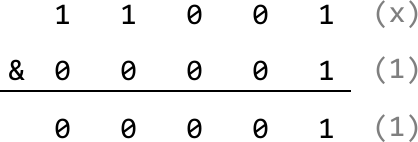
For starters, we can determine the least significant bit (LSB) of x by performing x & 1, which masks all bits of x except the LSB: if x & 1 == 1, the LSB is 1. Otherwise, it’s 0. We can see this below for x = 25:
Now, how do we check the next bit? If we perform a bitwise right-shift operation on x, we shift all bits of x one position to the right. This effectively makes this next bit the new LSB:
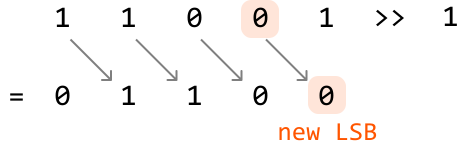
We now have a process we can repeat to count the number of set bits in a number:
- If
x & 1 == 1, increment our count. Otherwise, don’t. - Right shift
x.
Continue with the two steps above until x equals 0, indicating there are no more set bits to count. Doing this for every number from 0 to n provides the answer.
Implementation - Count Bits For Each Number
Python
JavaScript
Java

from typing import List

def hamming_weights_of_integers(n: int) -> List[int]:
    return [count_set_bits(x) for x in range(n + 1)]

def count_set_bits(x: int) -> int:
    count = 0
    # Count each set bit of 'x' until 'x' equals 0.
    while x > 0:
        # Increment the count if the LSB is 1.
        count += x & 1
        # Right shift 'x' to shift the next bit to the LSB position.
        x >>= 1
    return count

Complexity Analysis
Time complexity: The time complexity of hamming_weights_of_integers is O(nlog(n))O(n\log(n))O(nlog(n)) because for each integer xxx from 0 to nnn, counting the number of set bits takes logarithmic time, as there are approximately log2(x)\log_2(x)log2(x) bits in that number. If we assume all integers have 32 bits, the time complexity simplifies to just O(n)O(n)O(n), since counting the set bits for a number will take at most 32 steps, which we do for n+1n+1n+1 numbers.
Space complexity: The space complexity is O(1)O(1)O(1) because no extra space is used except the space occupied by the output.
Intuition - Dynamic Programming
In the previous approach, it’s important to note that by the time we reach integer x, we have already computed the result for all integers from 0 to x - 1. If we find a way to leverage these previous results, we can improve the efficiency of constructing the output array.
It would be wise to find a way to take advantage of some optimal substructure by treating the results from integers 0 to x - 1 as potential subproblems of x. This is the beginning of a DP solution. Let dp[x] represent the number of set bits in integer x.
A predictable way to access a subproblem of dp[x] is to right-shift x by 1, effectively removing its LSB. This is the subproblem dp[x >> 1], and the only difference between this and dp[x] is the LSB which was just removed.
As mentioned earlier, the LSB of x can be found using x & 1. Therefore:
- If the LSB of
xis 0, there is no difference in the number of bits betweenxandx >> 1:
![Image represents a diagram illustrating a bitwise right shift operation. The top row shows an initial value x represented by two encircled '1's, followed by three '0's. A blue arrow labeled 'LSB' points downwards, indicating the least significant bit is being processed. Grey arrows connect each bit in the top row to the corresponding bit in the bottom row. The top row represents the initial value of x, and the bottom row shows the result of the right shift operation (x >> 1). The encircled '1's in the top row shift one position to the right, resulting in the encircled '1's in the bottom row. The remaining bits are filled with '0's. To the right, dp[x] = 2 indicates the initial count of '1's in x, and dp[x >> 1] = 2 shows the count of '1's after the right shift. The diagram visually demonstrates how the right shift operation moves bits to the right, filling empty positions with zeros, and how this affects the count of '1's.](/courses/coding-patterns/images/hamming-weights-of-integers-5.svg)
- If the LSB of
xis 1, the difference in the number of bits betweenxandx >> 1is 1:
![Image represents a diagram illustrating a bit manipulation operation, likely within the context of a coding pattern related to bitwise operations or data structures. The diagram shows a binary number, x, represented by three bits: 110 (where the rightmost bit is the least significant bit, or LSB, as indicated by a blue arrow pointing to the rightmost '1'). These bits are enclosed in orange circles. A blue circle contains the LSB '1'. Grey arrows show the right bit-shift operation (>> 1), resulting in a new binary number 011. These shifted bits are also enclosed in orange circles. The text x = 1 1 0 labels the original binary number, while x >> 1 = 0 1 1 labels the result of the right bit shift. The expressions dp[x] = 3 and dp[x >> 1] = 2 suggest that dp is an array or function that counts the number of '1's in the binary representation of x and x >> 1, respectively. The values 3 and 2 reflect the number of '1's in the original and shifted binary numbers. The zeros in the diagram represent bits with a value of zero.](/courses/coding-patterns/images/hamming-weights-of-integers-6.svg)
Therefore, we can obtain dp[x] by using the result of dp[x >> 1] and adding the LSB to it:
dp[x] = dp[x >> 1] + (x & 1)
Now, we just need to know what our base case is.
Base case
The simplest version of this problem is when n is 0. In this case, there are no set bits, so the number of set bits is 0. We can apply this base case by setting dp[0] to 0.
After the base case is set, we populate the rest of the DP array by applying our formula from dp[1] to dp[n]. The answer to the problem is then just the values in the DP array, containing the number of set bits for each number from 0 to n.
Implementation - Dynamic Programming
Python
JavaScript
Java

from typing import List

def hamming_weights_of_integers_dp(n: int) -> List[int]:
    # Base case: the number of set bits in 0 is just 0. We set dp[0] to 0 by
    # initializing the entire DP array to 0.
    dp = [0] * (n + 1)
    for x in range(1, n + 1):
        # 'dp[x]' is obtained using the result of 'dp[x >> 1]', plus the LSB of 'x'.
        dp[x] = dp[x >> 1] + (x & 1)
    return dp
Complexity Analysis
Time complexity: The time complexity of hamming_weights_of_integers_dp is O(n)O(n)O(n) since we populate each element of the DP array once.
Space complexity: The space complexity is O(1)O(1)O(1) because no extra space is used, aside from the space taken up by the output, which is the DP array in this case.