Markdown lesson 118 total lessons

Longest Uniform Substring After Replacements

Stay in the lesson flow with grouped chapter navigation on the left and markdown content optimized for long reading sessions.

Longest Uniform Substring After Replacements

A uniform substring is one in which all characters are identical. Given a string, determine the length of the longest uniform substring that can be formed by replacing up to k characters.

Example:

The image represents a visual illustration of finding the longest uniform substring within a given string.  The input string 'a b c d c c c a' is shown on the left.  Two 'c' characters within this string are highlighted with orange diagonal lines, indicating they are part of a uniform substring. A rightward-pointing arrow separates the input string from the output. The output, displayed in a light-blue rectangular box, shows the identified longest uniform substring 'c c c c c'. Above the output box, the text 'Longest uniform substring' is written in light-blue, clearly labeling the purpose of the diagram. The diagram visually demonstrates the process of identifying and extracting the longest consecutive sequence of identical characters from a given input string.

Input: s = 'aabcdcca', k = 2
Output: 5

Explanation: if we can only replace 2 characters, the longest uniform substring we can achieve is “ccccc”, obtained by replacing ‘b’ and ‘d’ with ‘c’.

Intuition

Determining if a substring is uniform
Before we try finding the longest uniform substring, let’s first determine the most efficient way to make a string uniform with the fewest character replacements. Consider the example below:

Image represents a sequence of lowercase letters arranged horizontally.  The sequence is 'a b a a b a c', where each letter is individually spaced. There are no connections or arrows between the letters; they are simply presented as a linear string of characters. No URLs, parameters, or other information beyond the letters themselves are present in the image.  The letters appear to be a simple example data set, possibly illustrating a concept within the context of coding patterns, such as sequence analysis or pattern recognition.

Which characters should we replace to ensure the minimum number of replacements are performed to make the string uniform? There are three main choices: make the string all ‘a’s, or all ‘b’s, or all ‘c’s. The most efficient choice, requiring the fewest replacements, is to make all characters ‘a’, which involves just three replacements:

Image represents a transformation process illustrated using sequences of characters.  On the left, we see three subsequences: 'ab', 'aa', and 'ac'.  Each subsequence is individually marked with an orange arrow pointing diagonally upwards and labeled with 'a', indicating that the 'a' element is being processed or removed. A thick black arrow points from the left-hand sequences to the right-hand sequence.  The right-hand side shows a sequence of eight 'a's. The diagram visually depicts a transformation where the input consists of three subsequences containing 'a's and other characters ('b' and 'c'). The transformation removes elements other than 'a' from each subsequence, resulting in an output sequence containing only 'a's, effectively filtering or extracting 'a's from the input.

The key observation is that the minimum number of replacements needed to achieve uniformity is obtained by replacing all characters except the most frequent one.

This suggests that if we know the highest frequency of a character in a substring, we can determine if our value of k is sufficient to make that substring uniform. The number of characters that need to be replaced (num_chars_to_replace) can be found by subtracting this highest frequency from the total number of characters in the substring:
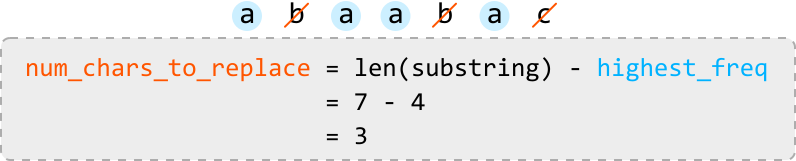
Image represents a calculation to determine the number of characters to replace in a substring.  At the top, a sequence of characters 'a b a a b a c' is shown, with the character 'b' and 'c' crossed out in orange, indicating they are to be replaced. Below this, a grey box contains a calculation: num_chars_to_replace = len(substring) - highest_freq. This equation calculates the number of characters to replace by subtracting the highest frequency of any single character (highest_freq) from the total length of the substring (len(substring)).  The calculation is then shown step-by-step:  len(substring) is explicitly given as 7, highest_freq as 4, resulting in a final answer of 3 characters to replace (num_chars_to_replace = 3).  The variables num_chars_to_replace, len(substring), and highest_freq are written in orange, black, and blue respectively, highlighting their roles in the calculation.

Once we’ve calculated num_chars_to_replace for a given substring, we can assess if the substring can be made uniform:

  • If num_chars_to_replace ≤ k, the substring can be made uniform.
  • If num_chars_to_replace > k, the substring cannot be made uniform.

To calculate num_chars_to_replace, we need to know the value of highest_freq. This requires tracking the frequency of each character, which can be efficiently managed using a hash map (freqs). This hash map allows us to update highest_freq whenever we encounter a character with a higher frequency. Below is an illustration of how freqs is updated:

Image represents a data flow diagram illustrating the process of finding the highest frequency of a character in a sequence.  The input, shown as 'a b c' with a downward arrow indicating data flow, represents a sequence of characters. This input feeds into a table labeled 'freqs', which is a two-column table with headers 'char' and 'freq'.  The table shows the character 'a' and its frequency '1'.  This table acts as an intermediate data structure storing character frequencies.  A separate box contains a code snippet: highest_freq = max(highest_freq, freqs['a']), which calculates the highest frequency encountered so far.  The variable highest_freq is updated using the max function, comparing its current value with the frequency of character 'a' (obtained from the freqs table using the key 'a'). The result of this calculation, '1', is displayed below the equation, indicating that the highest frequency found so far is 1.  The overall diagram shows how the input sequence is processed to determine the highest character frequency.

Image represents a data flow diagram illustrating a frequency counting algorithm.  The input consists of a sequence of characters 'a', 'b', 'b', 'c', depicted by a downward-pointing arrow above the sequence. This input feeds into a table labeled 'freqs,' which is a two-column table with headers 'char' and 'freq.'  The table stores the frequency of each character; 'a' has a frequency of 1, and 'b' has a frequency of 1.  A separate, light-grey, dashed-bordered box contains a Python code snippet: highest_freq = max(highest_freq, freqs['b']), which calculates the highest frequency encountered so far.  The result of this calculation, = 1, is shown below the code snippet.  The code implies an iterative process where highest_freq is updated by comparing it with the frequency of each character in the freqs table.  The 'b' is used as an example in the code snippet, suggesting the algorithm iterates through each character in the input sequence.

Image represents a data flow diagram illustrating the process of finding the highest frequency of characters in a sequence.  The input is a sequence of characters 'a b b c', depicted as a horizontal list. A downward arrow indicates this sequence is processed to generate a frequency table labeled 'freqs'. This table is a 2-column structure with the left column labeled 'char' representing characters and the right column labeled 'freq' representing their frequencies. The table shows 'a' with frequency 1 and 'b' with frequency 2.  To the right, a separate box shows a Python-like code snippet calculating the highest frequency. The code highest_freq = max(highest_freq, freqs['b']) calculates the maximum frequency by comparing a current highest_freq (implicitly initialized to 0 or a lower value not shown) with the frequency of character 'b' (which is 2 from the table). The result, = 2, is displayed below, indicating that 2 is the highest frequency found in the input sequence.

Image represents a data flow diagram illustrating the process of finding the highest frequency of characters in a sequence.  The input is a sequence of characters 'a b b c' shown with a downward arrow indicating data flow into a frequency table labeled 'freqs'. This table is a two-column structure with 'char' representing the character and 'freq' representing its frequency. The table shows 'a' with frequency 1, 'b' with frequency 2, and 'c' with frequency 1.  To the right, a calculation is shown: highest_freq = max(highest_freq, freqs['c']) = 2. This equation indicates that the highest_freq variable is updated by taking the maximum value between its current value (implicitly assumed to be initialized to a value less than or equal to 2) and the frequency of character 'c' (which is 1 from the table), resulting in a final highest_freq value of 2.  The diagram visually demonstrates how the frequency table is generated from the input sequence and how a maximum frequency is calculated using the table's data.

Now that we have the tools to determine if a substring can be made uniform, the next step is to figure out how to identify the longest uniform substring. Let’s explore a technique that lets us do this.

Dynamic sliding window
We know sliding windows can be useful for solving problems involving substrings. This problem requires that we find the longest substring that satisfies a specific condition:

num_chars_to_replace <= k

So, a dynamic sliding window might be appropriate, as discussed in the chapter introduction.

We can use the above condition to determine how to expand or shrink the window:

  • If the condition is met (i.e., the window is valid), we expand the window to find a longer window that still meets this condition.

  • If the condition is violated (i.e., the window is invalid), we shrink the window until it meets the condition again.

Let’s see how this works over the example below:

Image represents a sequence of characters 'a a b c d c c a' followed by a comma and then an equation 'k = 2'.  The sequence of characters appears to be a data set or input, possibly representing a string or an array of elements.  The characters 'a', 'b', 'c', and 'd' are individual elements within this sequence, arranged linearly from left to right.  There's no explicit connection shown between the character sequence and the equation 'k = 2', but the proximity suggests a relationship, possibly indicating that 'k' is a parameter or variable related to the processing or analysis of the character sequence.  The value '2' assigned to 'k' might represent a length, a count, or some other relevant property of the sequence.  The comma acts as a separator between the character sequence and the equation.


Start by defining the left and right boundaries of the window at index 0. Continue expanding the window for as long as it satisfies our condition (nums_char_to_replace <= k):


Image represents a visual explanation of a sliding window algorithm, possibly for character replacement or frequency analysis.  The left side shows a sequence of characters 'a a b c d c c a' with a light-blue highlighted 'a' at the beginning. Above this sequence, two boxes labeled 'left' and 'right' point downwards, indicating pointers or indices into the character sequence.  A value 'k = 2' is displayed, likely representing a parameter limiting the number of replacements or operations. The right side shows a calculation box. Inside, the variable highest_freq is set to 1.  A formula num_chars_to_replace = window_length - highest_freq is presented, followed by its evaluation as 1 - 1 = 0. Finally, the condition 0 ≤ k is shown, resulting in the action 'expand,' suggesting the window's size will increase. The overall diagram illustrates a step in an algorithm where the frequency of characters within a window is analyzed, and a decision is made based on the comparison of the number of characters to replace with the parameter 'k' to determine whether to expand the window.


Image represents a sliding window algorithm visualization.  Two labeled boxes, 'left' (in gray) and 'right' (in orange), point downwards with arrows towards a light-blue rectangular box containing the character sequence 'aa'. This sequence is part of a larger sequence 'aabcdcca' shown to the right.  A dashed arrow connects the 'right' box to the second 'a' in the light-blue box, indicating the window's current position. A separate gray box on the right displays calculations:  highest_freq = 2, representing the highest frequency of a character within the current window (which is 'a').  The next line calculates num_chars_to_replace = window_length - highest_freq, which evaluates to 2 - 2 = 0. The final line states 0 ≤ k --> expand, indicating that because the number of characters to replace is 0 or less, the window should expand.  The overall diagram illustrates a step in a sliding window algorithm where the window's size is determined by character frequencies.


Image represents a diagram illustrating a sliding window algorithm.  A sequence of characters 'a a b c d c c a' is shown.  Two rectangular boxes labeled 'left' and 'right' in gray and orange respectively, point downwards with arrows indicating the left and right boundaries of a sliding window currently encompassing 'a a b'.  A dashed orange arrow shows the window's right boundary moving one position to the right.  An upward red arrow labeled 'chars to replace' points to the character 'b' within the window, suggesting this character is a candidate for replacement. A separate gray box contains calculations:  highest_freq is set to 2, representing the highest frequency of a character within the window.  The formula num_chars_to_replace = window_length - highest_freq is shown, with a substitution using window_length = 3 resulting in num_chars_to_replace = 1. Finally, the condition 1 ≤ k → expand indicates that if the number of characters to replace (k) is greater than or equal to 1, the window should expand.


Image represents a diagram illustrating a sliding window algorithm.  A light-blue rectangular box displays a sequence of characters: 'a a b_c_ d c c a'.  A gray rectangular box to the right shows calculations: highest_freq = 2, num_chars_to_replace = window_length - highest_freq = 4 - 2 = 2, and 2 ≤ k → expand.  Above the character sequence, a rectangular box labeled 'left' points down with an arrow to the beginning of the sequence, and another rectangular box labeled 'right' (in orange) points down with a dashed arrow to the characters 'b_c_'. Red upward arrows under 'b_c_' are labeled 'chars to replace', indicating these characters are targeted for replacement. The calculation in the gray box determines the number of characters to replace (num_chars_to_replace) based on the window length (4) and the highest frequency of any character within the window (2). The result (2) is compared to a variable 'k', and if 2 is less than or equal to k, the window expands.


Once the window expands to the fifth character (‘d’), it will contain 3 characters that must be replaced to make the window uniform. Since we can only replace up to k = 2 characters, the window is invalid. So, we shrink the window:


Image represents a sliding window algorithm visualization.  A sequence of characters 'a a b c_d c c a' is shown, with a light-red background highlighting a sub-sequence 'a a b c_d'.  Arrows pointing upwards from beneath this sub-sequence are labeled in red as 'chars to replace'.  A grey box to the right displays calculations: 'highest_freq = 2', indicating the highest frequency of any character within the window.  The next line calculates 'num_chars_to_replace = window_length - highest_freq', substituting values to get '5 - 2 = 3'. Finally, '3 > k → shrink' suggests that if the number of characters to replace (3) exceeds a threshold 'k' (not explicitly defined), the window should shrink.  Rectangles labeled 'left' and 'right' above the character sequence indicate the direction of window movement, with a dashed arrow suggesting the right pointer's movement within the window.


The image represents a data structure manipulation process.  A sequence of characters 'a b c d' is shown centrally, highlighted in a light pink rectangle.  Above this sequence, two rectangular boxes labeled 'left' (in orange) and 'right' (in gray) indicate the direction of data input.  A downward-pointing arrow from 'left' connects to the first 'a' in the sequence, with a dashed arrow indicating an additional 'a' to the left of the main sequence. A downward-pointing arrow from 'right' connects to the last 'd' in the sequence. Below the central sequence, red upward-pointing arrows connect to each character (b, c, and d) with the text 'chars to replace' indicating these characters are targets for modification. To the right, a dashed-line rectangle displays the text 'highest_freq = 2 X', suggesting that the character with the highest frequency (presumably 'a' or 'c' based on the visible data) has a frequency of 2, and the 'X' likely represents a placeholder or an operation to be performed based on this frequency. The overall diagram illustrates a process where data is input from left and right, and characters within a central sequence are identified and potentially replaced based on frequency analysis.

Notice that after shrinking the window, the value of highest_freq is still 2, which is no longer correct. Recall that our current method for updating highest_freq only increases it when encountering a character with a higher frequency, meaning highest_freq can only remain the same or increase, but it can never decrease.

One way to work around this is to develop a new method for updating highest_freq that accurately decreases it when the highest frequency in a window decreases. However, our goal is to find the longest substring that meets the condition, so shrinking the window might not even be necessary. The crucial point here is that when we find a valid window of a certain length, no shorter window will provide a longer uniform substring.

This means we can just slide the window instead of shrinking it whenever we encounter an invalid window, effectively maintaining the length of the current window.

With this observation, we should correct our previous logic:

  • If the window satisfies the condition: expand.
  • If the window doesn’t satisfy the condition: slide.

Let’s correct the action taken in the first invalid window above by sliding instead of shrinking. Then, we can continue processing the rest of the string.


Image represents a sliding window algorithm visualization.  Two rectangular boxes labeled 'left' and 'right' point downwards to a sequence of characters 'a a b c d c c a' displayed horizontally. A light red background highlights the characters 'b c d' within the sequence. Red upward-pointing arrows beneath these highlighted characters are labeled 'chars to replace'.  To the right, a grey box shows a calculation:  highest_freq is set to 2; num_chars_to_replace is calculated as window_length (5) minus highest_freq (2), resulting in 3.  The final line indicates that if this result (3) is greater than some value k (not explicitly defined), a 'slide' operation should occur, implying the window moves along the character sequence.  The diagram illustrates how a sliding window identifies characters to be replaced based on frequency within the window, and the calculation determines the window's movement.


Image represents a sliding window algorithm visualization.  The left side shows a sequence of characters 'aabcdcca' with a highlighted sub-sequence 'a_b_c_d_c' in a light pink rectangle.  Orange boxes labeled 'left' and 'right' indicate pointers to the beginning and end of this window, respectively. Dashed orange arrows show the pointers moving across the sequence. Red upward arrows under the highlighted subsequence point to the text 'chars to replace,' indicating these characters within the window are candidates for replacement. The right side displays a calculation:  highest_freq is set to 2, representing the highest frequency of a character within the window.  The number of characters to replace is calculated as window_length (5) minus highest_freq (2), resulting in 3.  The final line states that if this result (3) is greater than a variable k (not defined in the image), then the window should slide.  The entire diagram illustrates how a sliding window algorithm determines which characters to replace based on frequency within a given window size.


Image represents a visual explanation of a sliding window algorithm, likely for character replacement or frequency analysis.  The left side shows a sequence of characters 'a a b c d c c a' with a light-blue highlighted window encompassing 'b c d c c'.  Orange rectangular boxes labeled 'left' and 'right' indicate pointers to the window's boundaries. Dashed arrows show the window's movement. Red upward arrows under the window point to the characters 'b', 'd', indicating these are characters to be replaced. The right side displays a calculation: highest_freq is set to 3, representing the highest frequency of a character within the window.  The number of characters to replace is calculated as window_length - highest_freq (5 - 3 = 2). The result (2) is compared to a variable 'k' (2 ≤ k), implying a condition for window expansion based on this comparison.  If the condition is met, the window expands; otherwise, it might contract or remain the same.


Image represents a sliding window algorithm visualization.  A sequence of characters 'a a b c d c c a' is shown.  A light-red rectangular box highlights a sub-sequence 'b c d c c a', representing a sliding window of length 6.  A grey box to the right displays calculations: highest_freq = 3 (indicating the highest frequency of any character within the window), and num_chars_to_replace = window_length - highest_freq = 6 - 3 = 3.  This calculation determines the number of characters to replace within the window.  Red upward arrows under the window point to the characters 'b', 'd', and 'c' labeled 'chars to replace'.  Rectangular boxes labeled 'left' and 'right' with arrows indicate the direction of the sliding window movement.  A dashed arrow shows the rightward movement of the window. The final equation 3 &lt; k → slide suggests that if the number of characters to replace (3) is less than some variable 'k', the window slides to the right.

The above window is the final window because we cannot expand or slide it any further. The longest valid window encountered during this process is a window of length 5.

Implementation

Python

JavaScript

Java

SVG Image

def longest_uniform_substring_after_replacements(s: str, k: int) -> int:
    freqs = {}
    highest_freq = max_len = 0
    left = right = 0
    while right < len(s):
        # Update the frequency of the character at the right pointer and the highest
        # frequency for the current window.
        freqs[s[right]] = freqs.get(s[right], 0) + 1
        highest_freq = max(highest_freq, freqs[s[right]])
        # Calculate replacements needed for the current window.
        num_chars_to_replace = (right - left + 1) - highest_freq
        # Slide the window if the number of replacements needed exceeds 'k'.
        # The right pointer always gets advanced, so we just need to advance 'left'.
        if num_chars_to_replace > k:
            # Remove the character at the left pointer from the hash map before
            # advancing the left pointer.
            freqs[s[left]] -= 1
            left += 1
        # Since the length of the current window increases or stays the same, assign
        # the length of the current window to 'max_len'.
        max_len = right - left + 1
        # Expand the window.
        right += 1
    return max_len

Complexity Analysis

Time complexity: The time complexity of longest_uniform_substring_after_replacements is O(n)O(n)O(n), where nnn is the length of the input string. This is because we traverse the string linearly with two pointers.

Space complexity: The space complexity is O(m)O(m)O(m), where mmm is the number of unique characters in the string stored in the hash map freqs.



