Find All Words on a Board
Given a 2D board of characters and an array of words, find all the words in the array that can be formed by tracing a path through adjacent cells in the board. Adjacent cells are those which horizontally or vertically neighbor each other. We can’t use the same cell more than once for a single word.
Example:
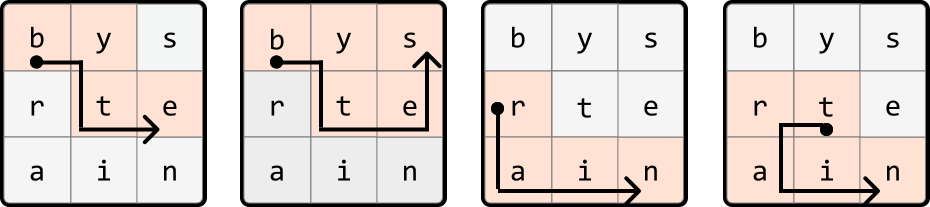
Input: board = [['b', 'y', 's'], ['r', 't', 'e'], ['a', 'i', 'n']],
       words = ['byte', 'bytes', 'rat', 'rain', 'trait', 'train']
Output: ['byte', 'bytes', 'rain', 'train']
Intuition
There are many layers to this problem, so let’s start by considering a simpler version where we’re only required to search for one word on the board.
Simplified problem: words array contains one word
With only one word to find, a straightforward approach is to iterate through each cell of the board. If any cell contains the first letter of the word, perform a DFS from that cell in all four directions (left, right, up, down) to find the rest of the word. This process involves backtracking from a cell when we cannot find the next letter of the word in any of its adjacent cells. The process continues until the word is found, or we can no longer find any more letters on the board.
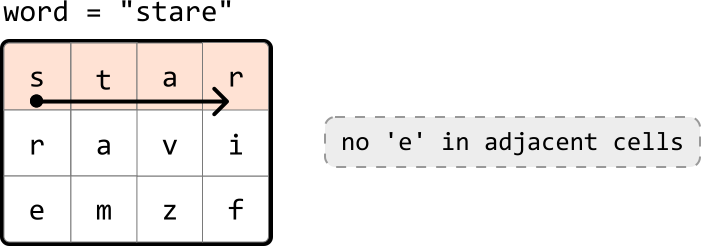
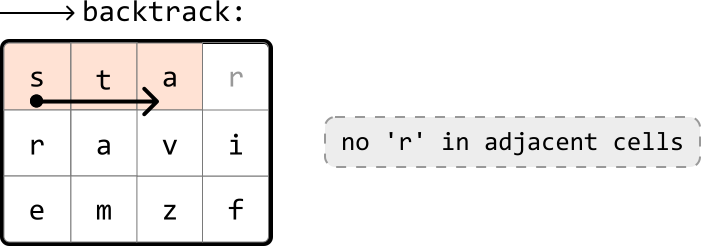
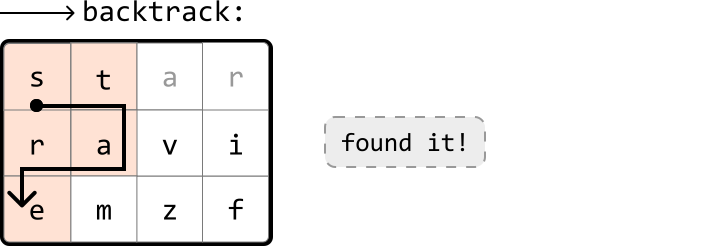
If you’re not familiar with backtracking, it might be useful to review the Backtracking chapter before continuing with this problem.
Original problem - words array contains multiple words
The above approach works well for one word, but repeating this process for every word in the array is quite expensive. Let’s devise a way to make our search more efficient. Consider the following board:
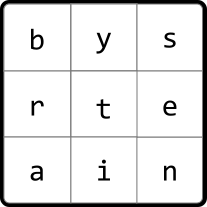
Let’s say the words array contains the words “byte” and “bytes”. Once we’ve found “byte”, we’d ideally like to extend the search by just one more cell to also find the word “bytes”:
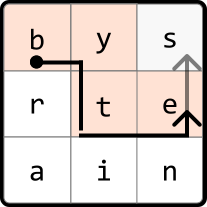
However, with our initial algorithm, we’d need to restart the search entirely to find “bytes.” This is quite inefficient. What we want is a data structure that allows us to efficiently search words with shared prefixes, allowing us to find multiple words without restarting the search for each of them. This is where the trie data structure comes into play, as it is excellent for managing prefixes.
Let’s begin creating the trie by inserting each word from the provided words array:
![Image represents a Trie data structure visualizing the storage of the words ['byte', 'rat', 'rain', 'bytes', 'trait', 'train']. A root node labeled 'root' branches into three main paths. The leftmost path, using dark-colored nodes, spells out 'bytes,' with each node representing a letter (b, y, t, e, s). Dashed lines connect the end nodes to labels indicating the complete words formed ('byte' and 'bytes'). The central path, also using dark-colored nodes, initially spells 'rat' (r, a, t), with a dashed line and label indicating the complete word. This path further extends to 'rain' (r, a, i, n) using a lighter-colored node for 'i' and 'n', again with a dashed line and label. The rightmost path, using dark-colored nodes, spells 'train' (t, r, a, i, n), with the final 'n' node having a dashed line and label indicating the complete word. The lighter-colored nodes in the 'rain' and 'train' paths indicate shared prefixes with other words in the Trie. The top line shows the Python list containing all the words stored in the Trie.](/courses/coding-patterns/images/find-all-words-on-a-board-7.svg)
In this chapter’s introduction, we discussed two options to mark the end of a word in a TrieNode. Here, we use the word attribute instead of is_word to determine if a TrieNode represents the end of a word, and to know which specific word has ended. This will be important later.
Let’s now use this trie to search for words over the board. We do this by seeing if any paths in the trie correspond with any paths on the board:
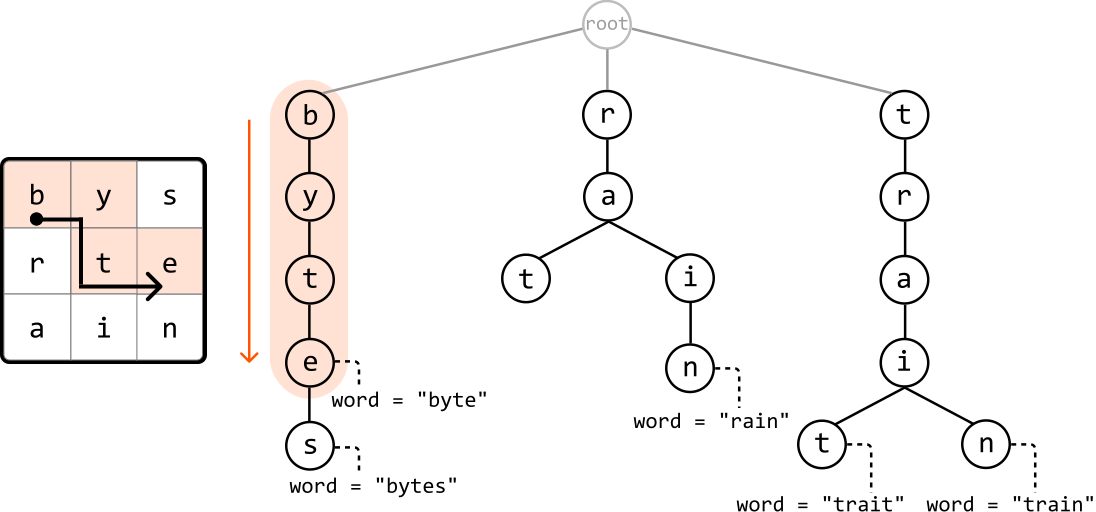
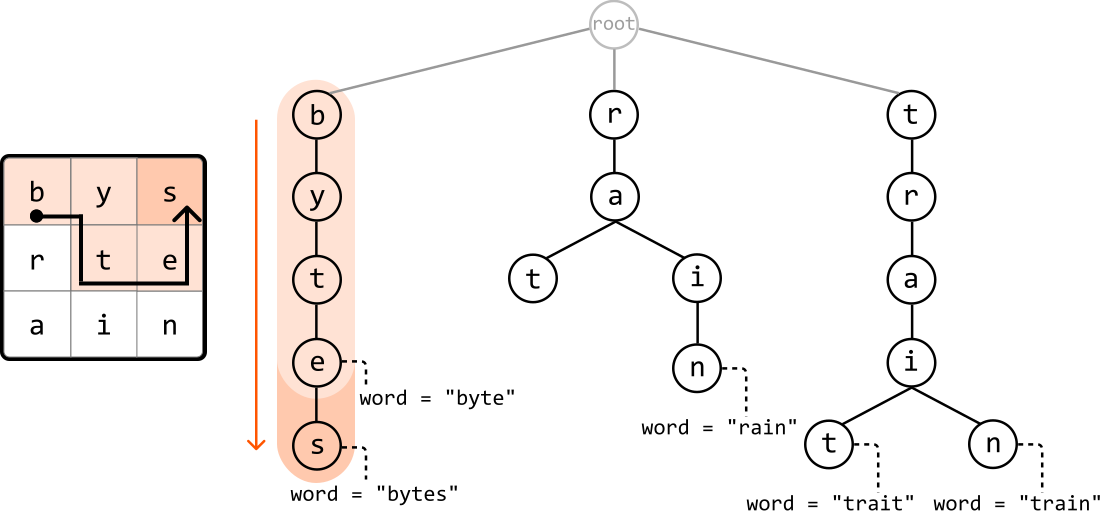
Similarly to how we used backtracking to search through the board when looking for a single word, we can also use backtracking here. Let’s have a closer look at how this works.
Backtracking using a trie
The first step is similar to what was discussed earlier: we go through the board until we find a cell whose character matches any of the root node’s children in the trie, representing the first letter of a word.
As soon as we start going through the board, we notice that the top-left of the board, cell (0, 0), contains the character ‘b’, which is a child of the trie’s root node.
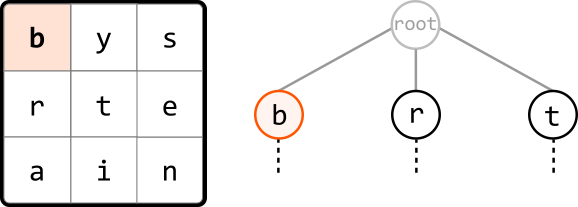
We can initiate DFS starting from this cell to see if the board contains the words formed by any of the paths branching from node ‘b’.
Checking through the adjacent cells of cell ‘b’, we notice that one contains ‘y’, which corresponds to a child of node ‘b’. So, let’s make a DFS call to this cell to continue looking for the rest of this trie path on the board.
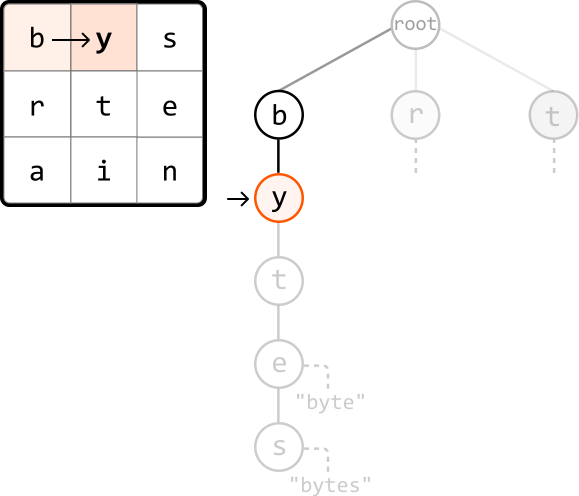
We continue this process until no more trie nodes can be found at an adjacent cell on the board. When this happens, we backtrack to the previous cell on the board to explore a different path.
If we ever reach a node that represents the end of the word (i.e., contains a non-null word attribute), we can record that word in our output:
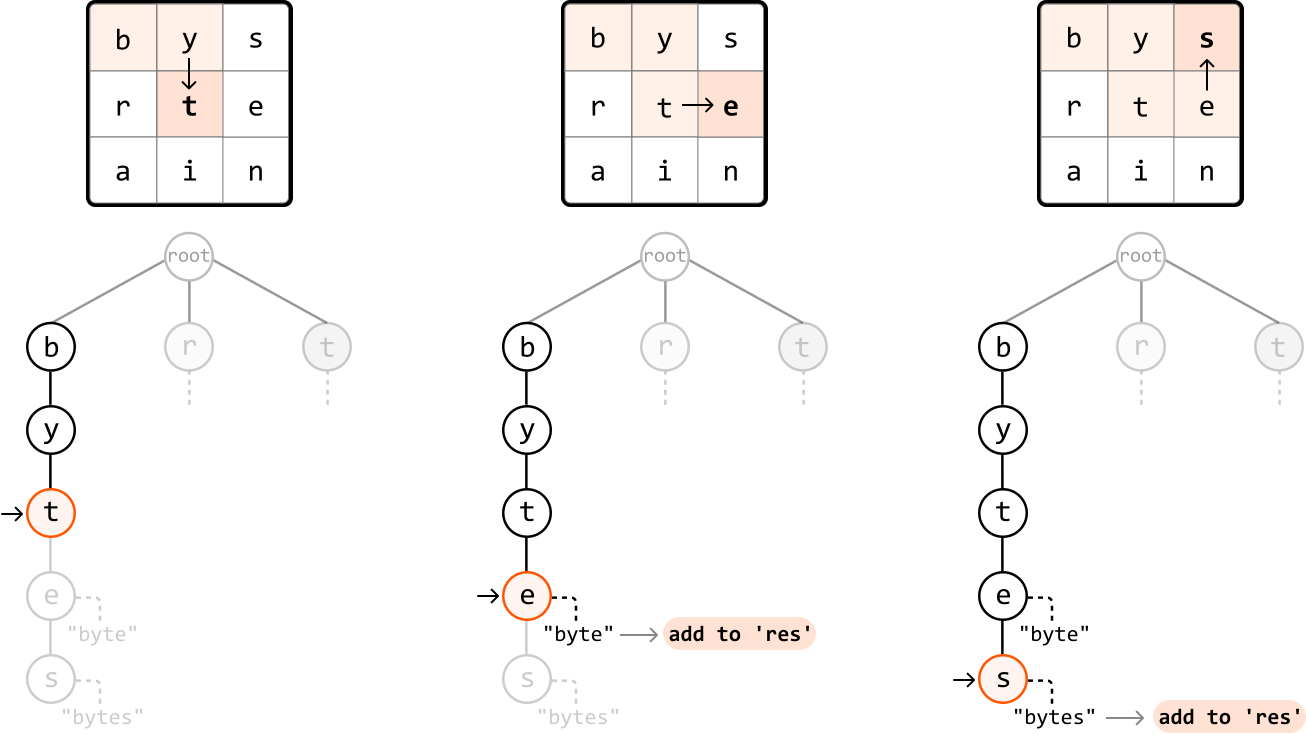
As shown, we found two words on the board from the DFS call that started at cell (0, 0). Now, we restart this process for any other cells on the board that match the character of one of the root node’s children.
One important aspect of this backtracking approach is keeping track of visited cells as we explore the board. Without this, we might revisit a cell unintentionally. For example, when exploring both children of node ‘i’, we could end up revisiting cell ‘t’:
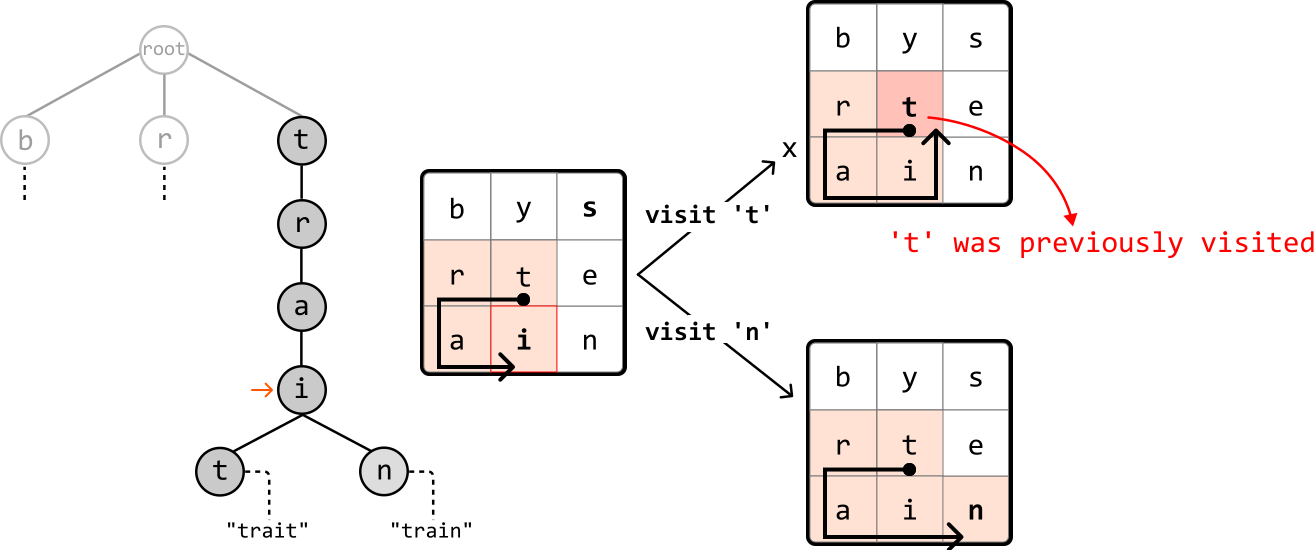
The remedy for this is to either keep track of visited cells using a hash set, or keep track of them in place by changing the visited cell to a special character (like ’#’) as we traverse:
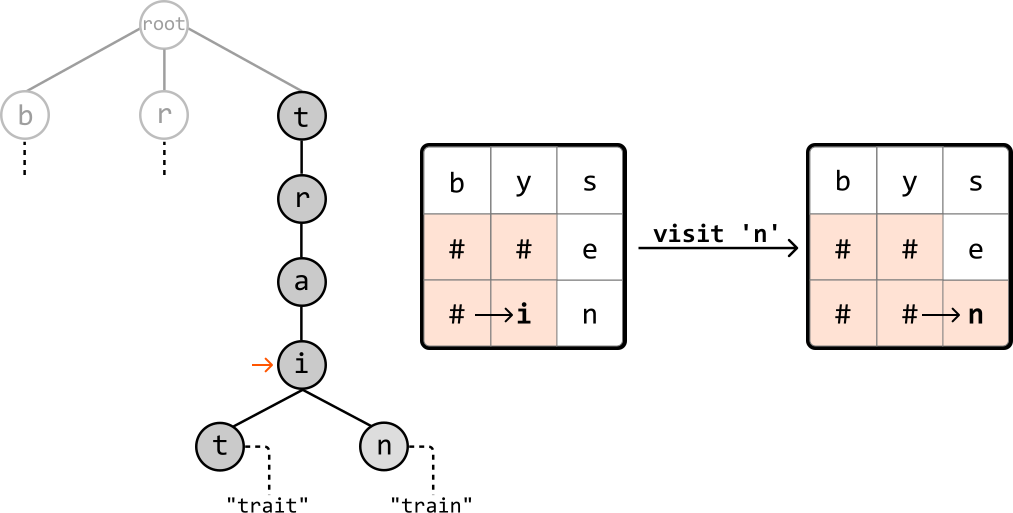
This shouldn’t be a permanent change to the board. So, we should undo this change at the end of each recursive call, as demonstrated in the following code snippet:
def dfs(r, c, board, node):
  temp = board[r][c]
  board[r][c] = '#'  # Mark as visited.
  for next_r, next_c in adjacent_cells:
      if board[next_r][next_c] in node.children:
          dfs(next_r, next_c, board, node.children[board[next_r][next_c]])
  board[r][c] = temp  # Mark as unvisited.
function dfs(r, c, board, node) {
const temp = board[r][c];
board[r][c] = '#'; // Mark as visited.
for (const [nextR, nextC] of adjacentCells) {
if (board[nextR][nextC] in node.children) {
dfs(nextR, nextC, board, node.children[board[nextR][nextC]]);
}
}
board[r][c] = temp; // Mark as unvisited.
}
Now, let’s walk through this process in detail.
For each cell on the board that matches a character of one of the root node’s children, make a recursive DFS call to that cell, passing in the corresponding node. At each of these DFS calls:
-
Check if the current node represents the end of a word. If it does, add that word to the output.
-
Mark the current cell as visited by setting the cell to ‘#’.
-
Recursively explore all adjacent cells that correspond with a child of the current
TrieNode. -
Backtrack by reverting the cell back to its original character (i.e., marking it as unvisited).
Handling multiple occurrences of the same word on the board
We need to be aware of the risk of adding duplicate words to the output, as the board may contain the same word in multiple locations. Remember that we use the word attribute on each TrieNode to check if it represents the end of a word. After recording a word in our output, we can set that node’s word attribute to null, ensuring we cannot record the same word again.
Implementation
class TrieNode:
  def __init__(self):
      self.children = {}
      self.word = None
class TrieNode {
constructor() {
this.children = {};
this.word = null;
}
}
from typing import List

def find_all_words_on_a_board(board: List[List[str]], words: List[str]) -> List[str]:
root = TrieNode() # Insert every word into the trie.
for word in words:
node = root
for char in word:
if char not in node.children:
node.children[char] = TrieNode()
node = node.children[char]
node.word = word
res = [] # Start a DFS call from each cell of the board that contains a child of the root # node, which represents the first letter of a word in the trie.
for r in range(len(board)):
for c in range(len(board[0])):
if board[r][c] in root.children:
dfs(board, r, c, root.children[board[r][c]], res)
return res

def dfs(board: List[List[str]], r: int, c: int, node: TrieNode, res: List[str]) -> None: # If the current node represents the end of a word, add the word to the result.
if node.word:
res.append(node.word) # Ensure the current word is only added once.
node.word = None
temp = board[r][c] # Mark the current cell as visited.
board[r][c] = '#' # Explore all adjacent cells that correspond with a child of the current TrieNode.
dirs = [(-1, 0), (1, 0), (0, -1), (0, 1)]
for d in dirs:
next_r, next_c = r + d[0], c + d[1]
if is_within_bounds(next_r, next_c, board) and board[next_r][next_c] in node.children:
dfs(board, next_r, next_c, node.children[board[next_r][next_c]], res) # Backtrack by reverting the cell back to its original character.
board[r][c] = temp

def is_within_bounds(r: int, c: int, board: List[str]) -> bool:
return 0 <= r < len(board) and 0 <= c < len(board[0])
class TrieNode {
constructor() {
this.children = Object.create(null);
this.word = null;
}
}
function find_all_words_on_a_board(board, words) {
const root = new TrieNode();
// Insert every word into the trie.
for (const word of words) {
let node = root;
for (const char of word) {
if (!(char in node.children)) {
node.children[char] = new TrieNode();
}
node = node.children[char];
}
node.word = word;
}
const res = [];
// Start a DFS call from each cell of the board that contains a child of the root
// node, which represents the first letter of a word in the trie.
for (let r = 0; r < board.length; r++) {
for (let c = 0; c < board[0].length; c++) {
if (board[r][c] in root.children) {
dfs(board, r, c, root.children[board[r][c]], res);
}
}
}
return res;
}
function dfs(board, r, c, node, res) {
// If the current node represents the end of a word, add the word to the result.
if (node.word) {
res.push(node.word);
// Ensure the current word is only added once.
node.word = null;
}
const temp = board[r][c];
// Mark the current cell as visited.
board[r][c] = '#';
// Explore all adjacent cells that correspond with a child of the current TrieNode.
const dirs = [
[-1, 0],
[1, 0],
[0, -1],
[0, 1],
];
for (const d of dirs) {
const next_r = r + d[0];
const next_c = c + d[1];
if (is_within_bounds(next_r, next_c, board) && board[next_r][next_c] in node.children) {
dfs(board, next_r, next_c, node.children[board[next_r][next_c]], res);
}
}
// Backtrack by reverting the cell back to its original character.
board[r][c] = temp;
}
function is_within_bounds(r, c, board) {
return 0 <= r && r < board.length && 0 <= c && c < board[0].length;
}
Complexity Analysis
Time complexity: The time complexity of find_all_words_on_a_board is O(L+m⋅n⋅3L)O(L+m\cdot n\cdot 3L)O(L+m⋅n⋅3L) where NNN denotes the number of words in the words array, LLL denotes the length of the longest word, and m⋅nm\cdot nm⋅n denotes the size of the board. Here’s why:
-
To build the trie, we insert each word from the input array into it, with each word containing a maximum of LLL characters. This takes O(N⋅L)O(N\cdot L)O(N⋅L) time.
-
Then, in the main search process, we perform a DFS for each of the mn cells on the board. Each DFS call takes O(3L)O(3L)O(3L) time because, at each point in the DFS, we make up to 3 recursive calls: one for each of the 3 adjacent cells (this excludes the cell we came from). This is repeated for, at most, the length of the longest word, LLL.
Therefore, the overall time complexity is O(N⋅L)+m⋅n⋅O(3⋅L)=O(N⋅L+m⋅n⋅3L)O(N\cdot L)+m\cdot n\cdot O(3\cdot L)=O(N\cdot L+m\cdot n\cdot 3L)O(N⋅L)+m⋅n⋅O(3⋅L)=O(N⋅L+m⋅n⋅3L).
Space complexity: The space complexity is O(N⋅L)O(N\cdot L)O(N⋅L). Here’s why:
-
The trie has a space complexity of O(N⋅L)O(N\cdot L)O(N⋅L). In the worst case, if all words have unique prefixes, we store every character of every word in the trie. Each
wordattribute stored at the end of a path in the trie takes O(L)O(L)O(L) space, and with NNN words. This contributes an additional O(N⋅L)O(N\cdot L)O(N⋅L) space. -
The maximum depth of the recursive call stack is LLL.
Therefore, the overall space complexity is O(N⋅L)+O(L)=O(N⋅L)O(N\cdot L)+O(L)=O(N\cdot L)O(N⋅L)+O(L)=O(N⋅L).