Markdown lesson 118 total lessons

Swap Odd and Even Bits

Stay in the lesson flow with grouped chapter navigation on the left and markdown content optimized for long reading sessions.

Swap Odd and Even Bits

Given an unsigned 32-bit integer n, return an integer where all of n’s even bits are swapped with their adjacent odd bits.

Example 1:

Image represents a diagram illustrating a binary addition process.  The diagram shows two rows of binary numbers, representing the addends. The top row displays the binary number 10101 (which is 21 in decimal), and the bottom row displays 010110 (which is 22 in decimal). To the right of each row is the decimal equivalent in parentheses: (41) and (22) respectively.  A horizontal arrow points to the beginning of the bottom row, indicating the start of the addition.  Between the two rows, orange curved arrows connect pairs of digits, visually representing the carry-over operation in binary addition.  Each arrow connects a pair of digits where a carry is generated (1 + 1 = 10 in binary, resulting in a 0 in the current position and a carry of 1 to the next position).  The arrangement and the arrows clearly show the step-by-step process of binary addition, highlighting the carry propagation.

Input: n = 41
Output: 22

Example 2:

Image represents a diagram illustrating a data transformation or processing step, possibly within a coding pattern related to binary data or bit manipulation.  The diagram shows two rows of binary digits (0s and 1s), labeled (23) and (43) respectively, representing input data. A horizontal arrow pointing to the right precedes the bottom row, indicating the direction of data flow.  Three pairs of vertically stacked binary digits are shown, each pair connected by an orange curved arrow pointing upwards from the bottom digit to the top digit.  This suggests a transformation or operation is applied to each pair, potentially a bitwise operation or a simple mapping.  The top row represents the output after this transformation, with the pairs of digits seemingly undergoing the same operation. The numbers (23) and (43) likely represent identifiers or labels for the input and output data sets, possibly indicating their source or destination within a larger system.

Input: n = 23
Output: 43

Intuition

Swapping even and odd bits means that each bit in an even position is swapped with the bit in the next odd position, and vice versa. Note that the positions start at position 0, which is the position of the least significant bit.

The key thing to notice is that, in order to perform the swap:

  • All bits in the even positions need to be shifted one position to the left.
  • All bits in the odd positions need to be shifted one position to the right.
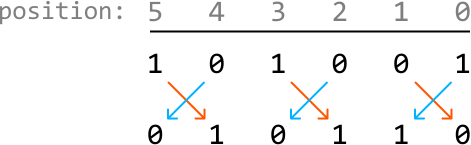
Image represents a visual depiction of a bitwise XOR operation across multiple positions.  The top row displays 'position:' followed by numbers 5 through 0, indicating the positional index of the bits. Below this, two rows of binary digits (0s and 1s) are presented. Each column represents a bit at a specific position.  Within each column, a pair of numbers is shown; the top number represents the input bit A, and the bottom number represents the input bit B.  Orange and light-blue arrows connect these input bits, visually demonstrating the XOR operation: an orange arrow points from the top bit to the bottom bit if the top bit is 1, and a light-blue arrow points from the bottom bit to the top bit if the bottom bit is 1. The result of the XOR operation (A XOR B) is implicitly shown by the arrangement of the arrows, where the presence of an arrow indicates a '1' result and its absence indicates a '0' result.  The pattern repeats across all positions, illustrating the consistent application of the XOR operation on each bit pair.

This suggests that if we had a way to extract all the even and odd-positioned bits separately, we could shift them accordingly and then merge them back together, so the odd-positioned bits are in the even positions, and vice versa.
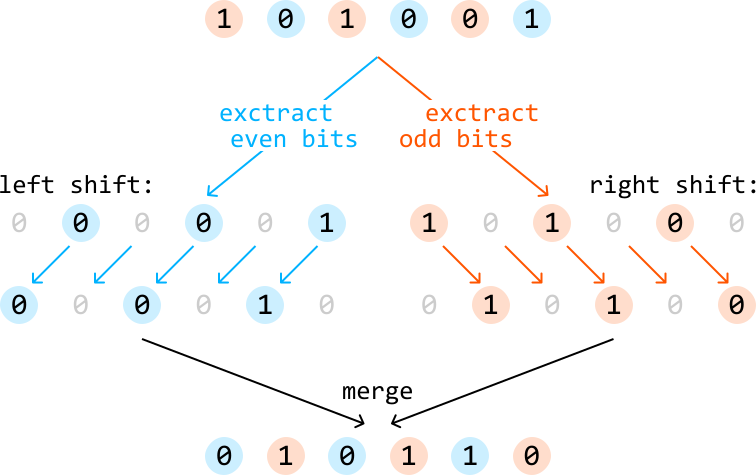
Image represents a flowchart illustrating a bit manipulation algorithm.  At the top, a sequence of bits '1 0 1 0 0 1' is shown.  This sequence is split into two branches. The top-left branch, labeled 'extract even bits' in cyan, uses a left shift operation, indicated by cyan arrows, resulting in the subsequence '0 0 1'. The top-right branch, labeled 'extract odd bits' in orange, uses a right shift operation, indicated by orange arrows, resulting in the subsequence '1 0 1'.  Each shift operation involves moving the bits to the left or right, with empty spaces filled by zeros.  The subsequences '0 0 1' and '1 0 1' are then merged at the bottom using a 'merge' operation, resulting in the final sequence '0 1 0 1 1 0'.  The intermediate steps clearly show the left and right shifts applied to the extracted even and odd bits respectively, before the final merging step.  The circles represent individual bits (0 or 1), with light blue circles representing the even bits and light orange circles representing the odd bits after the extraction.  Grey circles represent empty spaces or zeros introduced during the shift operations.

Let’s start by figuring out how to obtain the even and odd bits of n.

Obtaining all even bits
To obtain all even bits of n, we can use a mask which has all even bit positions set to 1:

Image represents a visual depiction of an 'even mask' applied to a sequence of numbers.  The top row displays a sequence of integers from 31 down to 0.  A horizontal gray line separates this sequence from a second row labeled 'even_mask ='.  The bottom row shows a corresponding sequence of 0s and 1s representing the even mask.  Each number in the top row is associated with a 0 or 1 in the bottom row;  a '1' indicates that the corresponding number in the top row is even, and a '0' indicates that it is odd.  The ellipsis ('...') in the bottom row signifies the continuation of this alternating pattern of 0s and 1s for the omitted numbers (27 to 6).  The arrangement clearly shows a one-to-one mapping between the input sequence (top row) and the resulting even mask (bottom row), illustrating a simple bitmasking operation.

Performing a bitwise-AND with this mask and n gives us an integer where all the bits at odd positions are set to 0, ensuring only the bits in even positions of n are preserved:

Image represents a bitwise AND operation demonstrating how to extract even-indexed bits from a binary sequence.  The top row shows a binary sequence of length 'n', represented by alternating 0s and 1s, with ellipses (...) indicating continuation of the pattern.  Below it, labeled 'AND', is a second row, 'even_mask', which is a binary sequence of alternating 1s and 0s, starting with 0. This acts as a mask.  A horizontal line separates these two rows from the result below, labeled 'even_bits'. This bottom row shows the result of a bitwise AND operation between the top and middle rows.  Each bit in the 'even_bits' row is the result of the AND operation between the corresponding bits in the top and middle rows.  Specifically, the even-indexed bits (0, 2, 4, etc.) from the top row are preserved in the result because they are ANDed with 1s from the 'even_mask' row (resulting in the original bit), while the odd-indexed bits are all 0s because they are ANDed with 0s from the 'even_mask' row (resulting in 0). The light-blue circles highlight the resulting even bits in the bottom row.

Obtaining all odd bits
Similarly, to obtain all the odd bits of n, we can use a mask with all odd bit positions are set to 1:

Image represents a visual depiction of an odd mask applied to a sequence of numbers.  The top row displays a sequence of integers from 31 down to 0, arranged from left to right.  These numbers are written in a light gray color.  A horizontal gray line separates this top row from the bottom row. The bottom row shows the result of applying an 'odd mask' to the top row.  The label 'odd_mask =' precedes this bottom row.  The bottom row contains a sequence of 1s and 0s, where 1 represents an odd number from the top row and 0 represents an even number.  The sequence of 1s and 0s directly corresponds to the top row, with each 1 or 0 positioned below its corresponding number above.  The ellipsis ('...') in the bottom row indicates the continuation of the alternating 1 and 0 pattern for the omitted numbers between 28 and 5 in the top row.  The pattern clearly shows that the odd mask identifies odd numbers with a value of 1 and even numbers with a value of 0.

Performing a bitwise-AND with this mask and n gives us an integer where all the bits at even positions are set to 0, ensuring only the bits at odd positions of n are preserved:

Image represents a bitwise AND operation to extract odd bits from a binary sequence.  The top row shows a binary sequence of length 'n', represented by a series of 0s and 1s, with ellipses (...) indicating continuation of the pattern.  Below this, labeled 'AND', is another binary sequence, 'odd_mask', which consists of alternating 1s and 0s, starting with 1.  A horizontal line separates these two rows from the result below, labeled 'odd_bits'. This bottom row displays the result of the bitwise AND operation between the top and middle rows. Each bit in the 'odd_bits' row is the result of the AND operation between the corresponding bits in the top and middle rows.  Specifically, a 1 appears in the 'odd_bits' row only when both corresponding bits in the top and middle rows are 1; otherwise, a 0 is produced.  The parentheses next to each row label '(n)', '(odd_mask)', and '(odd_bits)' indicate the description of the respective rows.  The peach-colored circles highlight the resulting bits in the 'odd_bits' row, visually emphasizing the outcome of the bitwise AND operation.

Now that we’ve extracted all the even bits and odd bits separately, let’s use them to obtain the result, where the bits at odd and even positions are swapped.

Shifting and merging the bits at odd and even positions
We can use the shift operator to shift the bits at even positions to the left once, and the bits at odd positions to the right once:
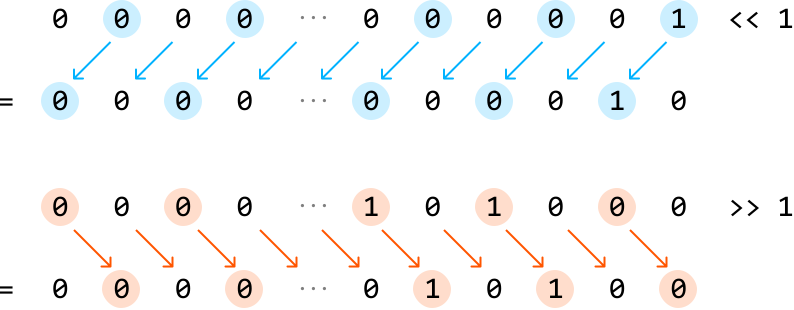
Image represents two parallel rows of data transformations.  The top row shows a sequence of numbers, primarily zeros, with some light-blue circled zeros and a single light-blue circled '1'.  Light-blue arrows point downwards from the light-blue circled numbers to the row below, indicating a transformation. The bottom row shows the result of this transformation, which is mostly zeros, with a single light-blue circled '1' in the result. To the far right, '<< 1' indicates a condition where the input contains a '1' at a specific position. The bottom row demonstrates a similar process, but with peach-colored circles containing zeros and a single peach-colored circled '1'.  Orange arrows point downwards from the peach-colored circled numbers to the row below, representing another transformation. The resulting bottom row contains mostly zeros, with a single peach-colored circled '1'.  To the far right, '>> 1' indicates a condition where the input contains a '1' at a specific position.  Ellipses (...) are used to represent the continuation of the sequences.  The equal signs (=) indicate the result of the transformations.  The overall diagram illustrates two different data transformation processes based on the presence or absence of a '1' in the input sequence.

Then, to merge these together, we can use the bitwise-OR operator because it combines the two sets of bits into the final result.

Image represents a bitwise OR operation illustrated using two rows of bits and a result row.  The top row, labeled '(shifted even_bits),' displays a sequence of bits represented by light-blue circles, containing mostly 0s with a single 1 near the end. The second row, labeled '(shifted odd_bits),' shows a sequence of bits in peach-colored circles, also primarily 0s but with a 1 in the middle.  Each bit in the top and bottom rows is vertically aligned. The label 'OR' is placed to the left of a horizontal line separating the input rows from the result row. The result row below the line shows the bitwise OR of the corresponding bits from the top two rows; each bit in this row is a light-blue circle if the corresponding bit in the top row is 1, otherwise it's a peach-colored circle if the corresponding bit in the bottom row is 1, and 0 otherwise.  The result demonstrates that the bitwise OR operation combines the bits from both input rows, resulting in a 1 if either of the corresponding bits is 1, and 0 only if both corresponding bits are 0.  Ellipses (...) are used to indicate that the sequences of bits continue beyond the displayed portion.

Now, the odd-positioned bits are in the even positions and vice versa.

Implementation

Python

JavaScript

Java

SVG Image

def swap_odd_and_even_bits(n: int) -> int:
    even_mask = 0x55555555   # 01010101010101010101010101010101
    odd_mask = 0xAAAAAAAA  # 10101010101010101010101010101010
    even_bits = n & even_mask
    odd_bits = n & odd_mask
    # Shift the even bits to the left, the odd bits to the right, and merge these
    # shifted values together.
    return (even_bits << 1) | (odd_bits >> 1)

Complexity Analysis

Time complexity: The time complexity of swap_odd_and_even_bits is O(1)O(1)O(1).

Space complexity: The space complexity is O(1)O(1)O(1).
